

Top 10 No-Code AI Tools to Boost Daily Productivity (2026)
Ten no-code AI tools worth your time in 2026: what each one does, what it costs right now, where free tiers hit their limits, and three realistic stacks ($0, $30, $75/month) matched to how you actually work.

You do not need to learn to code to put AI to work. The ten tools below all run on today's frontier models (OpenAI's GPT-6 family, Anthropic's Claude 5.5, Google's Gemini 4, as of October 2026), and every one of them is built for people whose job title has nothing to do with engineering. We checked what each tool costs right now, where its free tier actually stops, and which combinations make sense at three budgets: $0, $30, and $75 a month.
5 Things to Know Before You Pick One
- Every tool here works with zero coding. If a pick needed a developer, it did not make the list.
- The ten span seven jobs: general AI help, automation, writing, design, research, presentations, and workspace management. Match the tool to your bottleneck, not to the hype.
- Single tools run from free to about $20 a month, and nine of the ten have free tiers worth trying first. A realistic full stack lands between $0 and $75 a month.
- Automation tools return the most hours. If you only adopt one category, make it this one.
- Start with one tool and use it daily for two weeks before adding a second. Stacks fail from neglect, not from missing features.
What No-Code AI Tools Actually Are
No-code AI tools are software platforms that let you use artificial intelligence through visual interfaces, drag-and-drop builders, and plain-language prompts, without writing any code. Under the hood they wrap pre-trained models (names like GPT-6, Claude 5.5, and Gemini 4 as of October 2026) inside clean interfaces: chat boxes, toggles, templates, and flowchart builders. You describe the outcome. The model does the heavy lifting.
This matters now because the shift is measurable, not theoretical. Gartner expects roughly 75% of new enterprise applications to involve low-code technology by 2026, and forecasts that at least 80% of low-code users will sit outside formal IT departments by then. The no-code AI platform market itself is on track for about $9 billion in 2026. Translation: AI is no longer locked inside engineering teams. Marketers, operations leads, teachers, and solo founders build with it daily. The gatekeeping era is over.
No-code vs low-code, in one paragraph
No-code means zero programming: everything happens through visual builders and natural language. Low-code starts from the same visual builders but lets you drop into custom code when you need deeper control. If you are not technical and you want results this week, no-code is the right door.
The 10 Best No-Code AI Tools for Daily Productivity in 2026
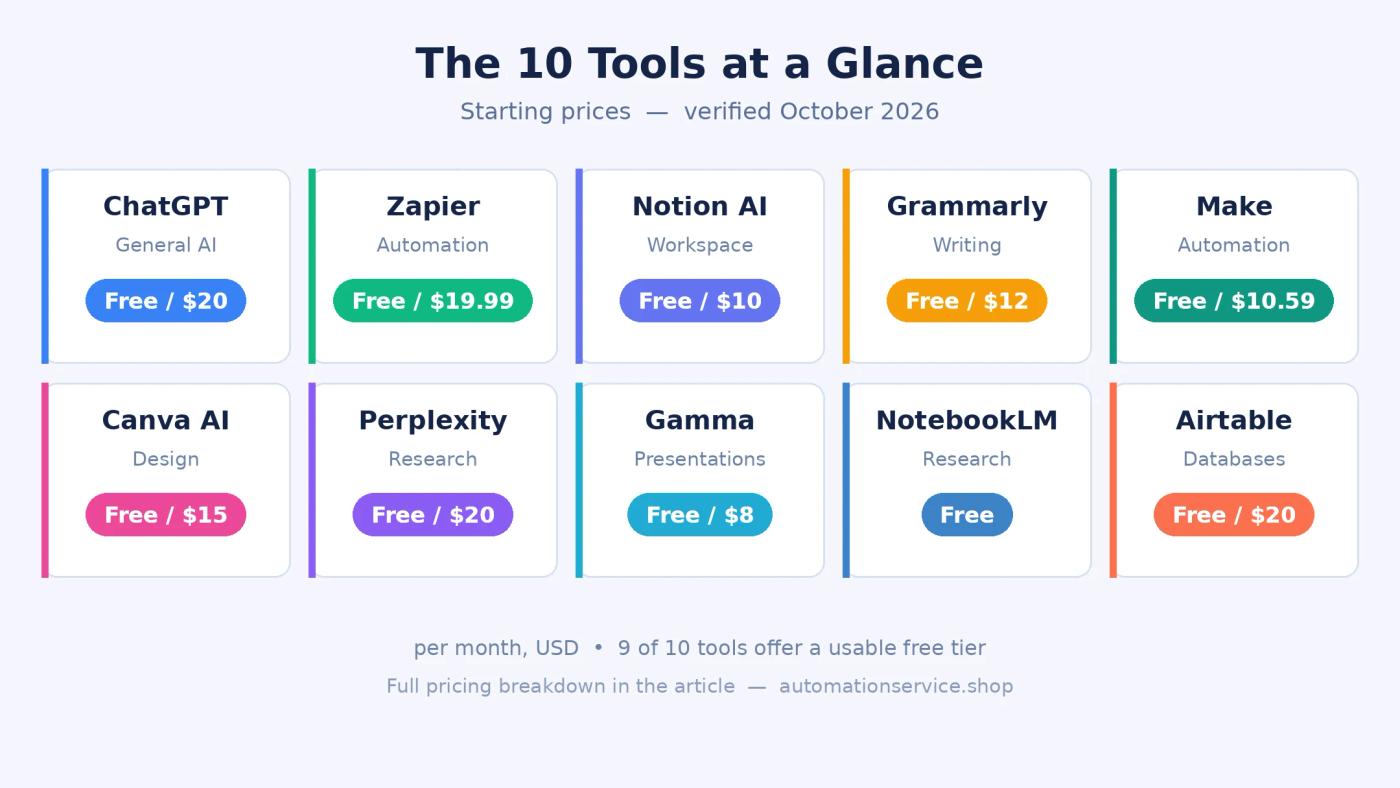
Here is the full lineup at a glance: ChatGPT (general AI), Zapier and Make (automation), Notion AI (workspace), Grammarly (writing), Canva AI (design), Perplexity and NotebookLM (research), Gamma (presentations), and Airtable (custom apps and databases). Each pick below covers what the tool does, three standout features, who it suits, and honest current pricing.
1. ChatGPT, the all-purpose AI assistant
OpenAI's ChatGPT remains the most versatile starting point: writing, research, data analysis, image generation, and voice conversation in one place. On the $20/month Plus plan you get the GPT-6 family of models (as of October 2026), higher usage limits, and features like deep research and advanced voice. Standouts: true multimodal input across text, image, voice, and files; built-in web browsing and code execution; and thousands of ready-made GPTs and integrations. Best for anyone starting their AI journey who wants one tool that handles nearly everything. Pricing: free tier available; Plus at $20/month. Official site: chatgpt.com
2. Zapier, automation across 7,000+ apps
Zapier connects the apps you already use, Gmail, Slack, Google Sheets, your CRM, through trigger-based workflows called Zaps: when X happens, do Y. You build them visually; no code involved. Standouts: the largest integration library in the category at 7,000+ apps; AI actions that draft content and enrich data inside workflows; and built-in Tables and Interfaces for lightweight internal apps. Best for non-technical teams automating work across many apps. Pricing: free (100 tasks/month); Professional from $19.99/month. Official site: zapier.com
3. Notion AI, the workspace that answers questions
Notion combines notes, docs, wikis, and project databases in one workspace, with AI woven through it: summarize any page, draft from a prompt, and ask questions across everything you have stored. Since 2025 the AI ships bundled inside paid plans rather than as a separate add-on. Standouts: Q&A across your entire workspace; AI autofill inside databases; and your choice of underlying frontier models. Best for teams keeping projects, notes, and knowledge in one hub. Pricing: free tier with limited AI; Plus at $10/user/month; Business at $20/user/month with AI included. Official site: notion.com
4. Grammarly, writing help everywhere you type
Grammarly checks grammar, clarity, tone, and style wherever you write: browser, email, documents, phone. Its generative AI drafts, rewrites, and adjusts tone, and teams can lock in a shared brand voice so everyone sounds consistent. Standouts: real-time suggestions in virtually every app; one-click rewriting with tone control; and plagiarism and AI-detection checks on higher plans. Best for anyone who writes emails, proposals, or reports daily. Pricing: free for the basics; Pro at $12/month on annual billing. Official site: grammarly.com
5. Make, visual automation at half the price
Make (formerly Integromat) builds automations as visual flowcharts: drag modules onto a canvas, connect them, and watch data move between apps. It handles branching, filtering, and error handling that competitors reserve for pricier tiers. Standouts: a genuinely visual scenario builder; advanced routing and conditional logic on affordable plans; and AI modules that classify or generate content mid-workflow. Best for small businesses and power users who want serious automation without Zapier-level pricing. Pricing: free (1,000 operations/month); Core from $10.59/month. Official site: make.com
6. Canva AI, design without a designer
Canva turns text prompts into presentations, social graphics, videos, and marketing materials, sitting on top of a huge template library. Magic Design generates full layouts from a single sentence, and one click removes backgrounds or extends images. Standouts: Magic Design and Magic Write for instant drafts; background remover and image extender; and Brand Kit to keep colors, fonts, and logos consistent. Best for marketers, creators, and founders producing visuals with no design training. Pricing: free tier; Pro at $15/month or $120/year. Official site: canva.com
7. Perplexity, research that shows its sources
Perplexity is an AI answer engine: ask a question and get a direct answer with inline citations to the sources it used. It now handles over a billion queries a month, and that citation habit is the whole point: you verify instead of trusting. Standouts: sourced answers with inline citations on every response; dedicated academic and professional research modes; and file upload so you can question your own documents. Best for analysts, researchers, and anyone who needs verified information fast. Pricing: free tier; Pro at $20/month. Official site: perplexity.ai
8. Gamma, presentations in under a minute
Gamma turns a prompt, an outline, or an existing document into a polished presentation, document, or website. With more than 70 million users, it leads the AI presentation category. Standouts: one-prompt decks you can restyle by chatting with Gamma Agent; documents and websites from the same input; and clean web links for sharing instead of file attachments. Best for anyone who builds decks or reports regularly and hates starting from a blank slide. Pricing: free (400 AI credits); Plus at $8/month; Pro at $15/month. Official site: gamma.app
9. NotebookLM, Google's free research assistant
NotebookLM lets you upload documents, PDFs, links, and videos, then work with them conversationally: summaries, timelines, study guides, and the signature Audio Overviews, a podcast-style discussion of your sources generated by AI. Everything it says stays grounded in what you uploaded. Standouts: answers that cite your own documents; Audio Overviews for learning on the go; and automatic study-guide generation. Best for students, researchers, and professionals drowning in long documents. Pricing: completely free, no paid tier. Official site: notebooklm.google
10. Airtable, databases that build themselves
Airtable pairs a familiar spreadsheet grid with a real relational database underneath, and its AI now builds apps, agents, and automations from plain-language descriptions. You describe the workflow; it scaffolds the tables, interfaces, and logic. Standouts: AI app and agent building from a sentence; interfaces and automations your team can actually use; and scale into millions of records. Best for teams that need custom internal tools on structured data without hiring developers. Pricing: free tier; Team at $20/user/month; Business at $45/user/month. Official site: airtable.com
All 10 Tools Compared
| Tool | Category | Free Tier? | Starting Paid Price | Best For |
|---|---|---|---|---|
| ChatGPT | General AI Assistant | Yes | $20/month | Anyone starting with AI |
| Zapier | Automation | Yes | $19.99/month | Cross-app workflow automation |
| Notion AI | Workspace | Yes | $10/user/month | Teams managing notes and docs |
| Grammarly | Writing | Yes | $12/month | Daily writers and communicators |
| Make | Automation | Yes | $10.59/month | Complex workflows on a budget |
| Canva AI | Design | Yes | $15/month | Marketers and solopreneurs |
| Perplexity | Research | Yes | $20/month | Analysts needing cited sources |
| Gamma | Presentations | Yes | $8/month | Fast presentation creation |
| NotebookLM | Research | Yes (fully free) | Free | Document-heavy research |
| Airtable | Custom Apps & Databases | Yes | $20/user/month | Teams building custom tools |
What a No-Code AI Stack Really Costs in 2026
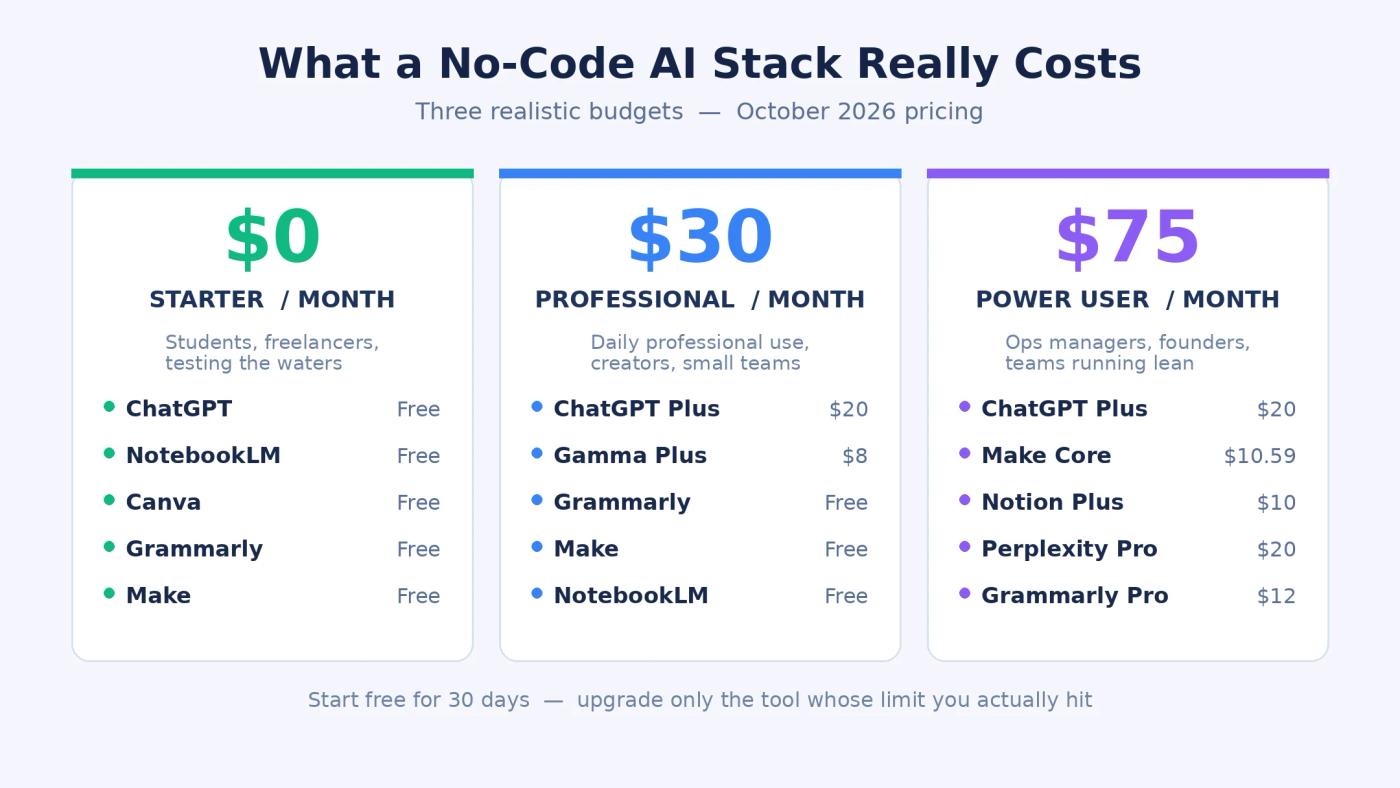
Per-tool prices only tell half the story. Real productivity comes from a stack: a few tools covering different jobs without overlapping. Here is the honest math at three budgets, and what each tier actually feels like to use.
The $0/month starter stack
Free tiers carry real weight: ChatGPT free for general help, NotebookLM for research, Canva free for design, Grammarly free for writing checks, and Make free for light automation. The limits are real, though. ChatGPT's free tier caps usage and serves slower models during peak hours. Canva free watermarks premium elements. Make free allows 1,000 operations a month: enough for a few workflows, not for daily automation. This tier suits students, freelancers testing the waters, and anyone who wants proof of value before spending.
The $30/month professional stack
ChatGPT Plus ($20) for the GPT-6 models and higher limits, plus Gamma Plus ($8) for unlimited presentations without branding: $28 a month, with Grammarly free and Make free filling the gaps. You pay to remove exactly the bottlenecks free tiers put in your way: throttled models in the middle of a task, usage caps, and watermarks on client deliverables. This tier suits professionals and creators who reach for AI several times a day but do not yet need heavy cross-app automation.
The $75/month power-user stack
ChatGPT Plus ($20), Make Core ($10.59), Notion Plus ($10), Perplexity Pro ($20), and Grammarly Pro ($12) land around $73 a month. Make sits in the middle and wires the stack together: Perplexity research saved to Notion automatically, ChatGPT drafts routed into review, database changes triggering follow-ups. This tier earns its cost for team leads, operations managers, and founders who need one person to move like three.
Expert tip: Start with the free stack for 30 days before upgrading anything. Upgrade only the tool whose limit you actually hit. Most people pay for capacity they never touch.
7 Mistakes to Avoid When Choosing No-Code AI Tools
1. Paying for overlapping tools. ChatGPT Plus and Perplexity Pro in the same stack often buy the same capability twice. Audit your subscriptions quarterly and cut the duplicate.
2. Ignoring free-tier caps until they bite mid-deadline. Nothing kills momentum like a usage-limit popup during client work. Read the caps on operations, messages, and credits before you depend on a free tier.
3. Automating tasks that are faster by hand. Automate what is repetitive, frequent, and rule-based. A five-minute monthly task is not worth a three-hour automation build.
4. Skipping the learning curve. Despite the marketing, each tool needs two to five hours of hands-on practice before you are genuinely fluent. Budget that time or the subscription becomes shelfware.
5. Connecting apps without reviewing permissions. Every integration is a door into your data. Check what each tool can read, write, and delete, especially for Gmail, Slack, and CRM connections.
6. Forgetting usage-based costs. Some platforms add AI usage charges on top of the subscription. A $20 plan can quietly become $60 or more at scale, so check the billing page monthly for the first quarter.
7. Building automations nobody maintains. Apps change their APIs and workflows break silently. If an automation matters, give it an owner and a quarterly check. When you outgrow simple Zaps and need workflows that survive real operations, our n8n guide walks through sustainable automation design, and our AI agent build guide shows the next step up.
Common mistake: Choosing tools for their feature lists instead of your bottlenecks. Start from the problem eating your week, then match a tool to it. Never the reverse.
Frequently Asked Questions
Do I need to learn prompt engineering before using these tools?
No. Every tool on this list is built so plain instructions work on day one, and most ship templates and guided setups. Learning to write clearer prompts does improve your results over time, but it is a skill you pick up by using the tools, not a prerequisite. Start with the templates, then refine.
Can my team share a single paid subscription?
In most cases, no. Tools like Notion and Airtable charge per seat, and sharing logins usually breaks the terms of service plus ruins personalization. The practical setup: pay per seat only for the tools your team touches daily, and keep occasional work on the free tiers.
Will no-code AI tools replace a virtual assistant or a junior hire?
They replace tasks, not judgment. Drafting, sorting, summarizing, and scheduling are all fair game for automation. Decisions, client relationships, and quality control still need a person. Most teams end up with the same headcount doing visibly more, not fewer people.
How long does it take to become productive with a no-code AI tool?
Plan on two to five hours of real, hands-on use per tool. That is the honest learning curve behind the "no-code" label: an afternoon of building real workflows with your own data. Tools you only click through once tend to become shelfware, so schedule the practice time before you judge the subscription.
Is it safe to connect my Gmail and company data to these tools?
It can be, with care. Review exactly what each integration can read, write, and delete before you approve it, especially for email, chat, and CRM connections. Keep sensitive client data off free tiers where privacy terms are thinnest, and prefer tools that publish SOC 2 or equivalent compliance documentation when the data matters.
Start With One Tool, Not Ten
You do not need ten subscriptions. Pick the tool that attacks your biggest weekly time drain, use it daily for two weeks, then add a second only if a clear gap remains. Start free, and pay when a limit you actually hit starts blocking real work. And keep an eye on where this is heading: agentic AI systems that take multi-step actions on your behalf are moving fast. Our guide to how AI automation is reshaping business in 2026 maps that shift. Prefer Claude over ChatGPT? Here is how to use Claude AI free in 2026 before you pay for anything. The door is open. Walk through it one tool at a time.
Related Articles


