Smart Picks logo
AI & Technology
5/22/2026

How to Use Claude AI for Free in 2026 (No Pro Needed)

Most guides quote a message count between 15 and 40 per day and stop there. The real number shifts based on something they never explain: how many tokens your session actually consumes. This guide covers exactly how Claude's free plan works in 2026, including the token-based quota system, how conversation context accumulates mid-session, and every verified free access path that most articles treat as an afterthought.

Claude AI free plan overview showing token-based limits and multi-device access in 2026

Key Takeaways About Claude AI Free Access

  • Claude AI is permanently free at claude.ai. No credit card, no trial period. Sign up with an email or Google account and start immediately.
  • Free users get Claude Sonnet, Anthropic's mid-tier model. The flagship Opus model is reserved for paid plans.
  • Message limits operate on a rolling 5-hour window, not a fixed daily reset. Quota is token-based, so longer prompts, file uploads, and growing conversation threads consume more of it than short text exchanges.
  • Web search, Artifacts, Projects, memory, and file uploads are all available on the free plan as of early 2026.
  • Claude Code, Research mode, and Opus access require a Pro subscription ($20/month) or higher.
  • Free-tier conversations may be used for model training. Paid plans include the opt-out.
  • Alternative free access exists through DuckDuckGo Duck.ai, Brave Leo, Poe, and Anthropic's Claude for Education program, though none deliver Sonnet-level capability.

What Is the Claude AI Free Plan?

Claude AI is Anthropic's conversational assistant, and the free plan gives you permanent, no-expiration access without any payment. This is not a trial. There is no countdown, no automatic upgrade prompt, and no credit card required at any point.

The free plan includes Claude Sonnet, the mid-tier model built for writing, analysis, coding, and everyday research. Opus, the higher-reasoning flagship model, is reserved for Pro and Max subscribers. You can access the free tier through the web at claude ai, the iOS and Android apps, or Anthropic's desktop client. Signup requires an email address or Google/Apple login, plus phone verification in most supported regions.

How to Sign Up for Claude AI Free Access

Getting started takes under two minutes:

  1. Go to claude.ai in any browser on desktop or mobile.
  2. Choose your sign-in method - email address, Google account, or Apple ID.
  3. Complete phone verification. Anthropic requires a valid phone number in most regions. This is a one-time step.
  4. Start using Claude immediately. After verification, you have full free-tier access to Sonnet, web search, Projects, file uploads, and memory.

One shortcut: signing in with a Google account can sometimes bypass phone verification, depending on your region and account history.

Supported Regions and Restrictions

The free plan covers most of North America, Europe, Latin America, and Asia-Pacific. Check Anthropic's supported countries page for the complete list. Users in unsupported regions may encounter errors during the verification step. No payment method is required at signup or at any point on the free plan.

Features Included on the Claude AI Free Plan in 2026

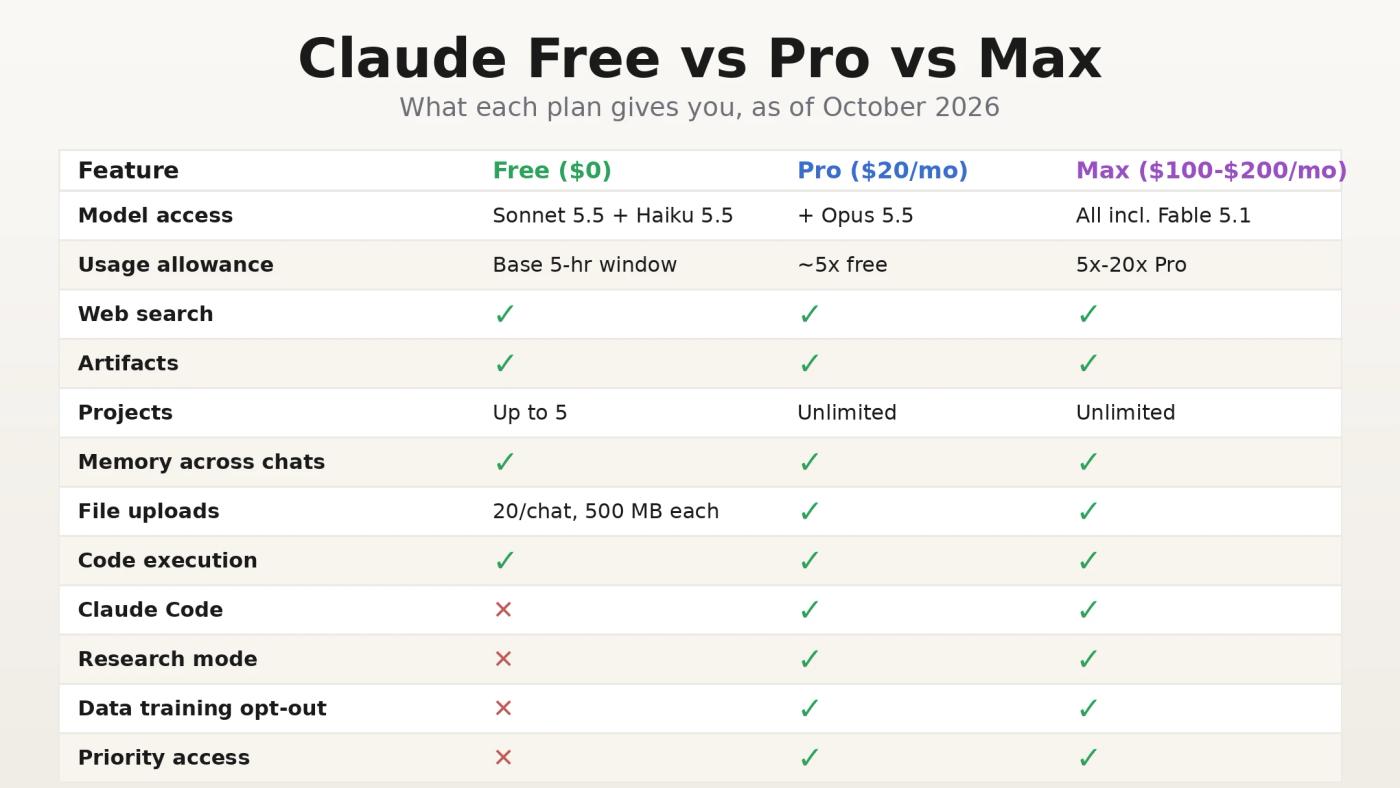
Claude AI free vs Pro vs Max feature comparison showing model access, message limits, file uploads, Research mode, and priority access in 2026

Anthropic's free tier is significantly more capable than it was a year ago. Between February and March 2026, features including Artifacts, Projects, and cross-conversation memory moved from paid-only to free. For most casual users, the free plan now covers the majority of what Claude can do.

Here is how the three individual plans compare:

Feature Free Pro ($20/mo) Max ($100-$200/mo)
Model access Sonnet Sonnet + Opus Sonnet + Opus
Message limits Base 5x Free 5x-20x Pro
Web search
Artifacts & Projects
Memory across chats
File uploads 20/chat, 30 MB each
Code execution
Claude Code (terminal)
Research mode
Data training opt-out
Priority access (peak hours)

The meaningful gaps between Free and Pro are Opus model access, the Claude Code terminal agent, Research mode for multi-source investigations, and the data training opt-out. Everything else is now available at zero cost.

What Free-Tier Guides Get Wrong About Claude AI Limits

Most articles in this space quote a flat message count between 15 and 40 per window. That figure is accurate but incomplete. Claude's free tier runs on a token-based quota system, and understanding how that system behaves, particularly as a conversation grows longer, is the difference between hitting a wall at message 6 and comfortably reaching message 35.

Your Quota Is Token-Based, Not Message-Based

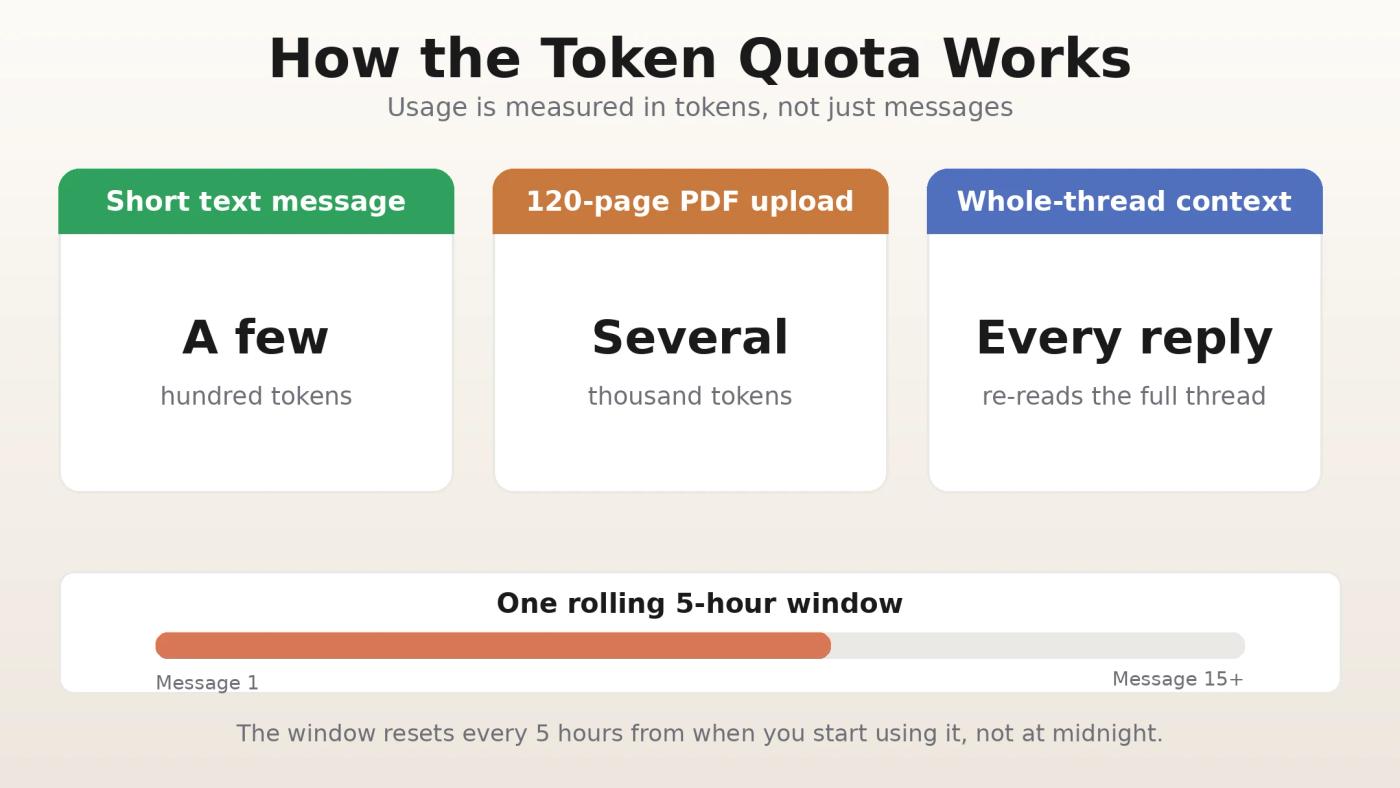
Claude AI token-based quota system showing how short text prompts use few tokens while large PDF uploads consume most of your free plan limit

Anthropic calculates your usage by total tokens consumed across your prompt, any uploaded files, and Claude's response combined. A short text question might use a few hundred tokens. Uploading three 20-page PDFs and requesting a detailed analysis can exhaust an entire 5-hour window in under eight exchanges. The "15 to 40 messages" range only holds for short, text-only conversations. File attachments, long prompts, and complex instructions compress that ceiling significantly.

How Context Accumulates Mid-Conversation and Why It Catches Users Off Guard

This is the failure mode most guides never cover, and it is the most common source of free-tier frustration.

Every message you send within an active conversation does not just carry your new question. Claude loads the entire conversation history as context with each exchange. Message 15 in a thread costs substantially more tokens than message 1, even if both questions are equally short. A file you uploaded in message 3 is re-processed as part of the context in message 4, message 10, and every subsequent exchange in the same thread.

This is why two users with identical quota limits can have completely different session lengths. Someone running a single, continuously growing conversation hits their limit far sooner than someone opening a fresh chat per topic.

The practical fix: start a new conversation for each distinct task. Before switching, write a one-paragraph summary of where you left off and paste it into the new chat. This context handoff approach is more token-efficient than letting a single thread grow indefinitely, even though it feels counterintuitive at first.

Peak Hours Throttle More Than Just Speed

During high-traffic periods, roughly 5 to 11 AM Pacific Time, Anthropic prioritizes compute resources for paid subscribers. Free users experience two effects during this window: a tighter effective token budget and slower response times. This is a compute allocation decision, not a hard quota change. The platform deprioritizes free-tier requests to protect paid user experience during demand spikes.

If your available session budget feels noticeably smaller on certain mornings, peak-hour prioritization is the likely cause rather than a platform issue. Scheduling heavier Claude sessions outside that window consistently delivers more messages per session.

Free Conversations May Train Future Models - What That Actually Means for You

Anthropic's terms allow conversations on the free plan to be used to improve future Claude models. Most guides mention this in a single sentence and move on. The practical implications deserve more attention.

For casual use, drafting emails, debugging short code snippets, summarizing articles, this is unlikely to matter. For work involving client information, proprietary processes, financial details, or personally identifiable data, this is a material concern. Paid plans (Pro, Team, Enterprise) include the ability to opt out of data usage entirely. If you are relying on Claude for professional tasks with sensitive content, the data training clause is a stronger argument for upgrading than message limits alone.

More Ways to Use Claude AI for Free Without a Pro Plan

Beyond claude ai, several third-party platforms and Anthropic programs offer legitimate Claude access at no cost. The critical context most articles skip: the majority of these deliver Claude Haiku, not Sonnet. Haiku is optimized for speed and low-cost inference. For single-turn factual questions, the difference is minor. For complex reasoning, iterative drafting, or detailed code review, Sonnet outperforms Haiku by a meaningful margin. Keep that distinction in mind when using any of the alternatives below.

  • DuckDuckGo Duck.ai - Claude Haiku access with no login, no account, no signup. The fastest way to try Claude without creating anything. Suitable for quick, throwaway single-turn questions. Not suitable for Projects, file uploads, or any task requiring context continuity.
  • Brave Leo - Claude Haiku built directly into the Brave browser sidebar. Open Brave, click the Leo icon, and start chatting. No account required. Sessions are stateless: no conversation memory, no file uploads, no persistent context.
  • Poe by Quora - Daily compute points spendable across multiple AI models including Claude. Free accounts get limited daily usage. Sonnet sessions on Poe consume significantly more points than Haiku sessions, so the daily budget runs thin faster than most users expect.
  • Anthropic API credits - Available to new developer accounts at console.anthropic.com . New signups receive roughly $5 in free credits, enough for several test sessions with Sonnet. No credit card required.
  • Claude for Open Source - Qualifying open-source maintainers receive six months of Claude Max 20x access, valued at approximately $1,200. Applications are open through June 30, 2026, for maintainers of projects with 5,000 or more GitHub stars or one million or more monthly npm downloads.
  • Claude for Education - Free institutional access through partner universities including Northeastern, LSE, Champlain, and Syracuse. Students at participating schools can check with their institution for eligibility. This pairs well with other AI study tools for students that complement Claude's research and writing strengths.

Why Free Alternatives Do Not Replace claude ai Sonnet

Using Duck.ai, Brave Leo, and Poe as Sonnet replacements is the most common strategic mistake free-tier users make.

All three deliver Haiku for free-tier users. Haiku performs close to Sonnet on simple, single-turn queries. The gap widens on anything requiring sustained instruction-following, multi-step reasoning, nuanced editing, or complex code tasks. Expecting Sonnet-quality output from Haiku-tier access leads to repeated frustration and incorrect attribution of the gap to prompting errors rather than model capability.

The smarter approach: use claude ai for tasks that genuinely benefit from Sonnet's reasoning depth and reserve Duck.ai or Brave Leo for quick single-question lookups that do not require it. Treating them as part of the same pool is the mistake; treating them as different tools for different tasks is the strategy.

Common Mistakes and Tips to Stretch Your Free Messages

  • Re-uploading the same file in every new chat. Use Projects to store files once and reference them across conversations without burning tokens on repeated uploads.
  • Sending one question per message instead of batching. Group related questions into a single prompt. Every message carries token overhead regardless of how short it is.
  • Leaving web search and extended thinking on by default. Both consume additional tokens when active. Turn them off for straightforward questions where neither adds real value.
  • Running heavy sessions during peak hours. The 5 to 11 AM Pacific window is when free-tier limits are tightest. Shifting demanding work outside that range noticeably extends session length.
  • Letting conversation threads grow without resetting. Context accumulates with every exchange. Start a fresh chat per topic rather than extending a single thread across multiple tasks.
  • Uploading raw PDFs when plain text works. Converting documents to plain text or Markdown before uploading significantly reduces token consumption compared to PDF parsing.
  • Assuming the quota resets at midnight. The 5-hour window rolls from your first message in a session, not from a fixed time of day. Timing your heavier sessions around that window avoids unnecessary waits.

Advanced Free-Tier Workflow Architecture

Prompt-level optimization only stretches the free tier so far. The users who consistently get the most out of each session are making structural decisions before they open the chat window.

  • Use Projects as persistent context, not file storage. The right mental model for Projects is a container for your standing instructions, task brief, style constraints, and background context, not a folder for files. When your Project instructions carry the working context, every new conversation inside that Project starts fully briefed without token-heavy copy-pasting. This is the single highest-leverage free-tier optimization available.
  • Segment workflows by token weight, not by topic. Heavy-context tasks, long document analysis, iterative code review, extended drafting, belong in dedicated Project chats. Quick lookups and short reformats belong in throwaway chats. Mixing high-weight and low-weight tasks in one growing thread escalates context size and compresses your effective session length unnecessarily.
  • Plan multi-step tasks to fit inside a single 5-hour window. A workflow that straddles the end of one quota window and the start of the next will stall mid-task. For sequential work where each step depends on the previous output, scheduling the full sequence inside one window matters more than optimizing individual message length.
  • Recognize when the free tier architecturally cannot support a task. Any workflow requiring sustained working context above approximately 15,000 tokens, complex codebases, lengthy multi-document cross-referencing, iterative revision across many drafts, will run into quality degradation before hitting a hard message limit. Claude begins losing instruction fidelity as context grows, regardless of message count. Recognizing this early saves quota on tasks that need a different approach rather than more prompting.

Edge Cases and Failure Modes on the Free Plan

  • Soft throttling is not the same as hitting your quota. Free users can experience significantly slower responses and shorter maximum output lengths before receiving any "limit reached" notification. This is Anthropic managing compute allocation during high-demand periods, not a platform error. The correct response is to wait briefly or shift to a lighter task, not to reload the page or troubleshoot your connection.
  • The memory feature carries invisible token overhead. Cross-conversation memory, now available on the free tier, injects relevant stored context into each new conversation automatically. This is a background token cost you cannot directly observe or adjust per session. Users with extensive memory histories carry a consistent overhead into every chat. If you do not actively rely on memory across conversations, turning it off can measurably extend your effective session length.
  • Regional access is not uniform during peak periods. Users in Southeast Asia, South Asia, and parts of Latin America connect through infrastructure farther from Anthropic's primary compute clusters. During high-demand overlaps, free-tier throttling in these regions can be more pronounced than the 5 to 11 AM Pacific window implies. If your free-tier experience degrades at specific local times without apparent cause, regional infrastructure load is a likely factor rather than account-level behavior.
  • Certain usage patterns trigger soft account restrictions. Anthropic's systems flag behavior associated with automation or policy violations: rapid consecutive messages, unusually high file upload volumes within short periods, or prompts structured like scripted inputs. Free accounts have less tolerance before a temporary restriction applies. Legitimate power users who work at pace can encounter this. Varying prompt structure and pacing sessions typically resolves the issue without requiring support contact.

FAQ

How many free messages can I send on Claude AI per day?

There is no fixed daily count. Claude's free plan operates on a rolling 5-hour window with token-based consumption. Short text-only prompts might allow 30 to 50 messages per window. Longer prompts with file attachments, or extended conversation threads where context accumulates, can reduce that to under 10. The variable that matters most is how much context your conversation is carrying, not how many messages you have sent.

Is Claude Pro free for students in 2026?

Anthropic does not offer a public student discount for Claude Pro. Students at partner universities, including Northeastern, LSE, Syracuse, and Champlain, can access free Claude through the Claude for Education program. Anthropic also runs a Campus Ambassador program that provides individual Pro access by application. Students can explore AI note-taking tools that complement Claude's research and writing strengths.

Is there a Claude Pro free trial available in 2026?

No standing public trial exists for Pro or Max plans. Promotional trial offers occasionally surface in the upgrade flow for existing free users but are not guaranteed or reliably triggerable on demand.

Can I use Claude AI without creating an account?

Yes. DuckDuckGo Duck.ai and Brave Leo both provide Claude Haiku access with no signup required. These are stateless sessions with no memory, Projects, or file uploads, but sufficient for quick, single-turn questions that do not require Sonnet-level reasoning.

Is Claude AI's free plan better than ChatGPT's free tier?

It depends on your primary use case. Claude's free tier delivers stronger reasoning and writing quality, a larger effective context window, and now includes Projects and memory at no cost. ChatGPT's free plan offers a broader tool ecosystem including image generation. Google Gemini provides more generous daily message volume. Claude leads on writing depth and context handling; the others lead on tool breadth and raw message volume.

When does upgrading to Claude Pro actually make sense?

Three situations clearly justify the upgrade: your work involves sensitive professional data where data training opt-out is a requirement; your core tasks need Opus-level reasoning or Research mode, neither of which has a free equivalent; or your work is time-sensitive enough that peak-hour throttling creates real operational risk. If none of those apply, the free tier with the workflow adjustments above is likely sufficient. Students and casual users can also explore free no-code AI tools to extend their AI toolkit without additional cost.

The Upgrade Decision: A Framework Based on What You Actually Do

The standard upgrade advice, switch to Pro when you hit your message limit, is technically correct and practically unhelpful. Message volume is often the least important variable in the decision.

Upgrade if any of the following apply:

  • Your work involves client data, proprietary workflows, or personally identifiable information. Data training exposure on the free tier is a professional liability in these contexts regardless of how rarely you hit the message cap.
  • Your core tasks require Opus-level reasoning. Complex legal document analysis, sophisticated financial modeling, or high-stakes writing with layered constraints benefit meaningfully from Opus. If you are compensating with additional iteration cycles on Sonnet, the time cost likely exceeds $20 a month in opportunity cost.
  • You run recurring multi-source investigations. Research mode has no free equivalent and is operationally distinct from anything achievable through manual Sonnet sessions. For journalists, analysts, and researchers who do this regularly, Research mode alone justifies the upgrade.
  • Your workflow is deadline-driven and cannot be scheduled around quota windows. The unpredictability of peak-hour throttling becomes a genuine operational risk when task timing cannot be controlled.

Stay on the free plan if:

  • Your use is general-purpose, non-sensitive, and schedulable. With proper workflow architecture, the free tier supports substantial daily Claude usage without consistent interruption.
  • You already use multiple AI platforms. Distributing usage across the free tiers of Claude, ChatGPT, and Gemini is often more cost-effective and more resilient than a single Pro subscription when your needs are not Claude-specific.
  • Your tasks fit comfortably within Sonnet's capability range. Paying for Opus access you do not need adds monthly cost without improving output quality for your actual workload.

Is the Claude AI Free Plan Worth It?

For most people, yes. After the feature expansions of early 2026, the free tier includes Sonnet, web search, Artifacts, Projects, memory, file uploads, and code execution, all without spending a dollar. That is a genuinely capable toolkit for students, casual users, and professionals evaluating whether Claude fits their workflow before committing to Pro.

The real limitations are not the headline message count. They are the data training exposure for sensitive professional work, Opus and Research mode being locked behind Pro, and the operational unpredictability of peak-hour throttling for deadline-sensitive tasks. If none of those apply to your situation, the free plan delivers substantial value.

Anthropic has consistently expanded free-tier capabilities over the past year. The free plan today covers more than Pro did twelve months ago, and that trajectory shows no signs of reversing. For a broader look at fitting AI tools into daily routines, the guide on AI tools for everyday life covers practical workflows across productivity, research, and decision-making.

If you consistently hit the message cap or need Opus-level reasoning for daily work, the upgrade pays for itself quickly. If you do not, the free plan, used strategically, is genuinely enough.

Related Articles

n8n AI Automation Guide 2026: Real Cost, Use Cases & Benefits

n8n AI Automation Guide 2026: Real Cost, Use Cases & Benefits

n8n AI automation guide 2026 is not just about plan pricing — the real cost depends on deployment choice, self-hosting overhead, and workflow volume. This guide breaks down cloud vs. self-hosted setups, the hidden DevOps work most articles skip, and the real business use cases where n8n delivers the most value, so you can choose the right setup with a clear view of total cost.

How to Get Free Claude AI API Credits in 2026

How to Get Free Claude AI API Credits in 2026

Most users never realize their free Claude AI API credits expire 14 days after clicking one button, not after signing up. This guide maps every verified credit path (from $5 to $150K+), walks through the exact claim process, and reveals five mistakes that silently drain your balance before you build anything useful.

How to Use ChatGPT for Daily Life

How to Use ChatGPT for Daily Life

Most ChatGPT guides hand you a list of fun prompts and call it a day. This one covers the full lifecycle: setup, real daily prompts, privacy settings, billing fixes, workplace detection risks, and a clean exit plan. You will finish knowing how to use ChatGPT for daily life without the blind spots.