

Build an AI Agent with n8n: Step-by-Step 2026 Guide
Build an AI agent with n8n step by step: trigger, LLM, production-safe memory, tools, and the guardrails that keep it reliable under real traffic. Not a demo, a working agent.

A normal n8n workflow follows a fixed path. An AI agent gets a goal instead. That one difference is the whole reason to read this guide: when a task needs a knowledge lookup, a drafted reply, and a judgment call in one run, a rigid if/then chain breaks. An agent works through it on its own.
With n8n you build this without writing code. The AI Agent node connects a language model to tools you define, reasons about which tool to call, and loops until the task is done. As of October 2026 (n8n 2.4x line), all agent nodes run as the Tools Agent by default, with native LangChain plumbing underneath.
This guide builds one working agent from a blank canvas: trigger, model, memory, tools, system prompt, and the guardrails that keep it reliable once real traffic hits. For the money side, pricing, and whether to run Cloud or self-hosted, see our n8n cost and hosting decision guide. This page stays focused on the build.
What You Will Learn
- What the n8n AI Agent node does, and how it differs from a normal LLM node or a fixed workflow.
- The 7 steps to a working agent: trigger, agent node, chat model, memory, tools, system prompt, testing.
- Which models to connect in 2026, including local models through Ollama for private data.
- Which memory backend survives production, and why Simple Memory does not.
- The 4 agentic design patterns, and when to graduate from one to the next.
- The guardrails that stop an agent from silently skipping a critical step at scale.
What an n8n AI Agent Actually Is
The AI Agent node is not a fancier LLM node. An LLM node takes a prompt and returns text, once. The Agent node takes a goal, picks a tool, calls it, reads the result, and decides what to do next. It keeps looping until the task is done or it hits your iteration cap.
A traditional workflow does the same thing on every run: trigger, step A, step B, step C. An agent can take a different path on every run because it evaluates the input at runtime. That flexibility is the point, and it is also the risk. A workflow fails the same way every time, which is easy to debug. An agent can succeed nine times and quietly skip a critical tool call on the tenth, with identical input. The guardrails section below exists because of exactly that.
| Aspect | Traditional n8n Workflow | AI Agent |
|---|---|---|
| Path | Fixed: the same nodes in the same order, every run | Goal-driven: the agent picks tools per run |
| Decision-making | Predefined logic | The LLM reasons at each step |
| Data handling | Passed in a fixed node order | Selects which sources to query dynamically |
| Adaptability | Requires manual workflow editing | Adapts reasoning based on input content |
| Tool usage | All nodes execute in sequence | The agent chooses which tools to call per run |
| Failure mode | Predictable, same failure point | Non-deterministic, may skip steps silently |
Build It in 7 Steps
You need four components working together: something that starts the workflow, the AI Agent node, memory, and tools it can call. The steps below add them in order.
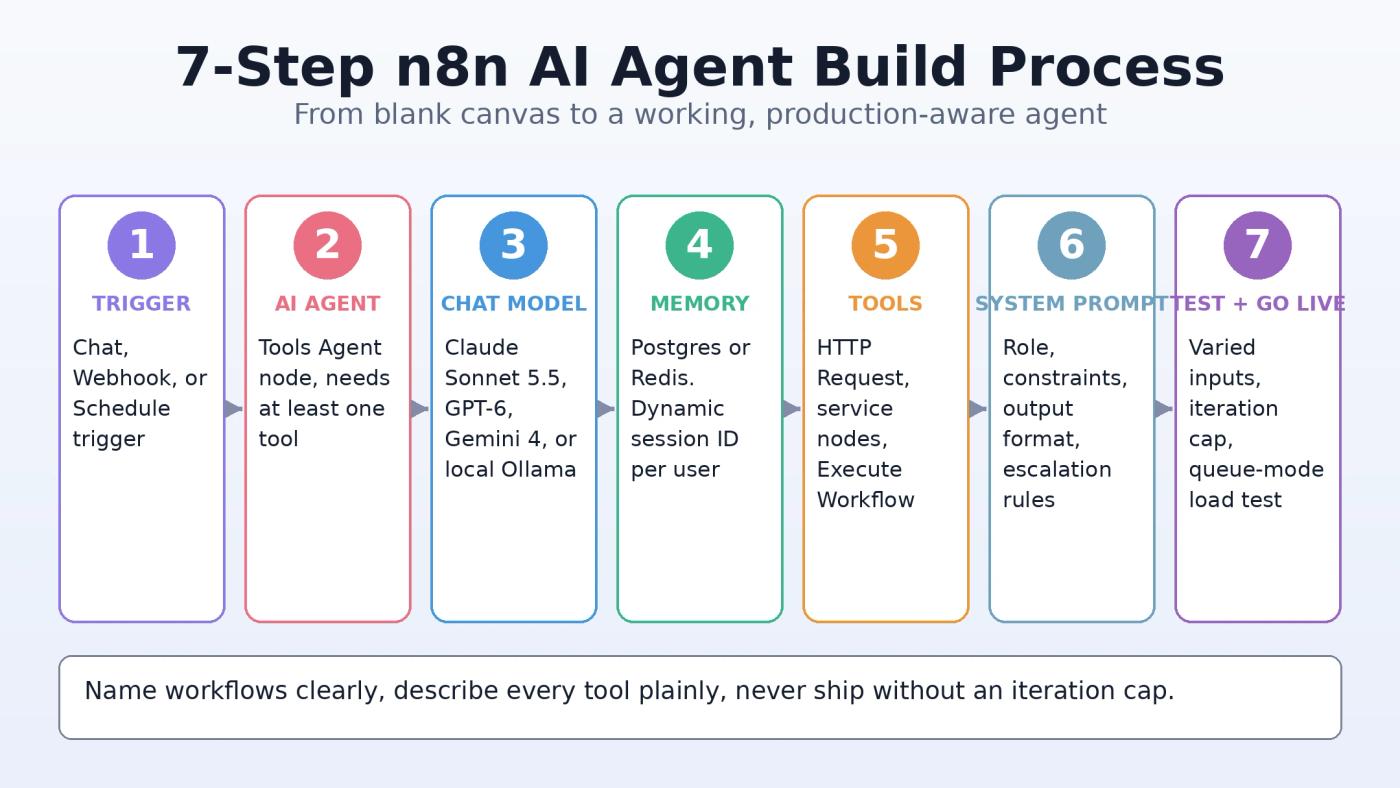
Step 1: Create the Workflow and Add a Trigger
Start a new workflow and pick the trigger that matches your use case. Use Chat Trigger for conversational agents, Webhook when another system starts the run, or Schedule Trigger for autonomous runs on a timer. Name the workflow clearly now. You will reference that name when this agent becomes a sub-agent inside a bigger system later.
Step 2: Add the AI Agent Node
Place the AI Agent node right after the trigger. Current n8n 2.x runs it as the Tools Agent by default, so there is nothing to configure here beyond knowing that the node refuses to execute without at least one connected tool. If you are upgrading an old build, the earlier agent modes are being phased out in the n8n 3.0 migration, so new builds should use the current node version.
Step 3: Connect a Chat Model
Attach an LLM credential to the Chat Model input. As of October 2026 the sensible picks are Claude Sonnet 5.5 for complex reasoning, the GPT-6 family, Gemini 4, or cheaper options like Groq and DeepSeek for lighter work. Match the model to the task: a strong reasoning model for multi-step synthesis, a smaller one for routing and classification. Running your biggest model on a simple classification job burns budget without improving accuracy.
Where external API calls are not allowed, connect a local model through Ollama using its endpoint URL as the credential. No API key needed, and every token stays on your own hardware. The caveat is real and worth testing honestly: open-weight local models are much weaker at tool-calling than hosted models. A local model that cannot reliably call tools will happily answer from its own knowledge instead, which defeats the purpose of the agent. Validate tool-call accuracy against your real workflow before production, and turn on Force Tool Call on First Iteration (available since n8n 2.40) if the model answers without touching its tools.
Step 4: Choose Memory That Survives Production
Connect a memory sub-node so the agent keeps context across messages. Simple Memory is development-only. It lives in the process's local memory, resets on restart, and n8n's own documentation warns against it in queue mode, where consecutive calls can land on different workers and the context simply vanishes. Dev environments usually run single-process, so this failure only shows up after you deploy.
For anything real users touch, choose one:
- Postgres Chat Memory. Durable, survives restarts, shared across all workers. The default right choice for most deployments. Cap the context window or add a summarization strategy first: every turn replays the full stored history into the prompt, so an uncapped session grows until it hits the model's context limit and inflates the cost of every reply.
- Redis Chat Memory. Faster reads and writes, the pick for high-traffic real-time agents where latency matters.
Either way, set a dynamic session ID per user, derived from a user ID or UUID in the trigger payload. A static session ID merges every user's history into one thread, which is a cross-user data leak waiting to happen.
Step 5: Attach Tool Sub-nodes
Connect the tools the agent can call. Three patterns cover nearly everything:
- HTTP Request Tool for any external API.
- Native n8n service nodes as tools (Gmail, Slack, Google Sheets) for everyday business apps.
- Execute Workflow Tool to call a separate n8n workflow as a sub-agent with its own isolated logic.
Write a plain, specific description on every tool: what it does, when the agent should use it, and what it returns. The description is how the agent decides when to call it, and vague descriptions are a top cause of agents answering without using their tools. If the agent must not run unsupervised, start it with a read-only tool so the first version can only look things up.
Step 6: Write a System Prompt With Teeth
Set the System Message in the agent node options. Name the agent's role, its constraints, the output format, and the escalation rules. Specific prompts cut down inconsistent behavior; vague prompts are the main source of unpredictable tool-call decisions.
A prompt that says "answer user questions" gives the agent no guardrails. Give it something closer to: "You are the support agent for [product]. Answer only from the attached knowledge base. If confidence is below 80 percent, escalate to human review. Always respond in JSON with keys: answer, confidence, sources." The difference in production behavior is not subtle.
Step 7: Test, Debug, and Activate
Use the built-in Chat panel to test the agent in isolation, then read the execution log to inspect every tool-call decision, not just the final answer. Validate against varied real inputs, never the one example that always works. Turn on Return Intermediate Steps so you can see each tool call in the log; when a tool fails, the error goes back to the agent as text and can hide inside a confident-sounding answer.
Two things to do before activating:
- Set a maximum iteration cap in the agent node. An unguarded agent can loop indefinitely against a paid LLM API, and every iteration resends the full accumulated context, so each call costs more than the last.
- Test under queue mode with concurrent sessions if production will run that way. Concurrency failures where two sessions interfere are invisible in single-run testing and only appear under load.
4 Agentic Design Patterns: When to Use Each
Most beginners build everything as a Single Agent. That works at first. Knowing the other three prevents expensive rework when the agent outgrows one node.
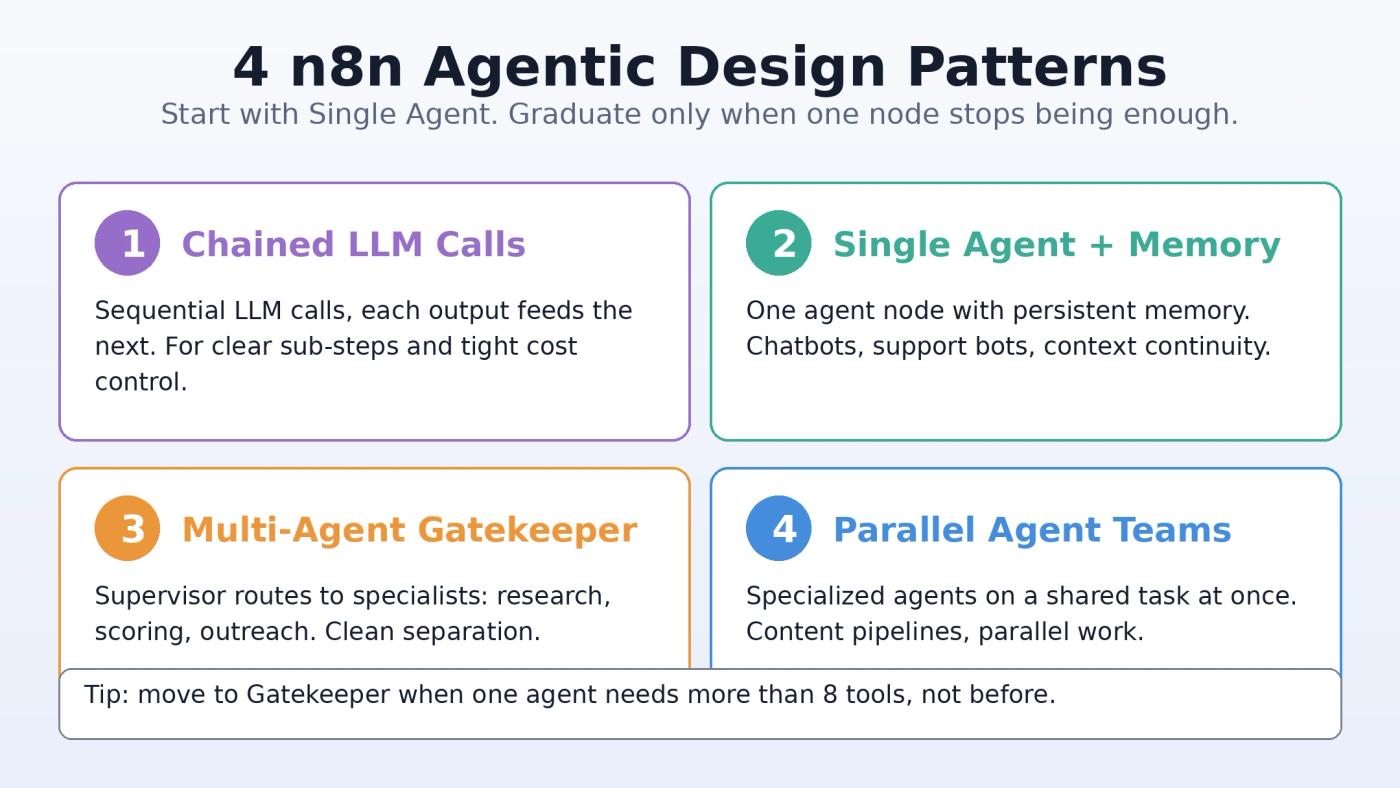
Chained Requests. Sequential LLM calls where each output feeds the next, with ordinary nodes doing processing in between. Use it when the task has clear, predictable sub-steps and you want tight control over cost.
Single Agent with Memory. One AI Agent node with persistent memory handling multi-turn conversation. The right pick for customer-facing chatbots, support bots, and anything where context continuity across messages is the whole product.
Multi-Agent with Gatekeeper. A supervisor agent routes tasks to specialized sub-agents and consolidates the results. Use it for workflows that need clean separation of concerns, like lead qualification split across research, scoring, and outreach agents.
Multi-Agent Teams. Parallel specialized agents working on a shared task with distributed decision-making. Use it for content pipelines or parallel data processing where simultaneous workstreams actually speed things up.
Rule of thumb from production experience: start with Single Agent, and move to Multi-Agent with Gatekeeper when you catch yourself cramming more than 8 tools into one agent node. Tool-count degradation is a more common failure than needing multi-agent collaboration too early.
Why Your Agent May Skip Steps, and the Guardrails That Fix It
LLM reasoning is probabilistic. The same input can produce different tool-call sequences on different runs, and that is not a bug, it is how inference works. The real-world pattern is documented: an agent calls every required tool on nine consecutive runs, then silently skips a critical step on the tenth with identical input. In one community-reported case, an invoice classifier routed the same document differently across runs with no input change at all.
Any workflow where a skipped step triggers something irreversible, sending an email, updating a CRM record, processing a payment, cannot rely on the model's reasoning alone to guarantee that step runs. Four techniques close the gap:
- Validate with IF or Filter nodes before and after agent decisions, so inputs and outputs match expected formats before downstream steps fire.
- Wrap irreversible logic in an Execute Workflow Tool. The sub-workflow runs deterministically, independent of the agent's reasoning path.
- Set a maximum iteration cap on the agent node to stop runaway loops against a paid API.
- Add human-in-the-loop approval with the Wait node and a webhook resume for any action that cannot be undone.
A strong system prompt reduces inconsistency but cannot eliminate it. Prompts operate in the probabilistic layer; guardrails operate in the deterministic layer. Production agents need both.
3 Use Cases That Work Well
Gmail triage and auto-draft agent. A Gmail Trigger watches an inbox. The agent classifies intent, drafts a reply grounded in a knowledge base, and either sends it or routes it to a human based on a confidence threshold. Teams with heavy inbound email get the biggest immediate time win here.
Customer support bot with RAG memory. The agent queries a Pinecone or Supabase vector store of product documentation and answers from retrieved chunks instead of model knowledge. This genuinely cuts hallucination on product questions, with one catch worth knowing upfront: RAG moves the hallucination risk from the model to the retrieval layer. Bad document chunking splits related facts across fragments, and an oversized top-k floods the prompt with noise. Instruct the agent to escalate when no retrieved chunk is relevant enough, instead of letting it answer confidently from weak evidence.
Lead qualification agent. A Webhook receives new lead data from the CRM. The agent researches the lead with a web search tool, scores it against your qualification criteria, drafts a personalized outreach email, and logs everything back to the CRM through an HTTP Request tool. For the broader question of which automations are worth building first, see AI automation use cases for business in 2026.
Frequently Asked Questions About Building AI Agents with n8n
Do I need to know how to code to build an AI agent with n8n?
No. The visual node builder covers the full agent architecture: drag lines between nodes, configure through dropdown menus. A Code node is available for custom JavaScript or Python, but memory, tools, and the LLM connection all work without writing code.
Can n8n connect to local LLMs like Ollama instead of cloud models?
Yes. Point the Chat Model credential at your Ollama endpoint (for example, http://localhost:11434) and pick a model. No API key needed, and all data stays on-premise. Validate the model's tool-calling accuracy before production, since open-weight models vary widely in function-calling reliability.
What is the best design pattern in n8n for beginners?
Start with the Single Agent pattern: one AI Agent node, Postgres Chat Memory for anything real users touch, and two or three tool nodes. It is the simplest to debug and grows naturally into a Multi-Agent with Gatekeeper setup as requirements expand.
Does n8n support multi-agent systems?
Yes. Multi-Agent with Gatekeeper routes tasks through a supervisor to specialized sub-agents, while Multi-Agent Teams run parallel agents on a shared goal. Both use the Execute Workflow Tool to keep each agent's logic modular and independently testable.
How does n8n handle agent memory across sessions?
It depends on the memory node. Simple Memory is session-only and unsuitable for queue mode production. Postgres Chat Memory stores history in a database, durable across restarts and shared across workers. Redis Chat Memory trades some durability for faster read/write on high-traffic agents. Every memory node needs a unique session ID per user.
Start Building
An n8n AI agent is not a smarter workflow. It is a different architecture: a goal comes in, and the agent reasons its way through tools until the task is done. The two things most tutorials leave out are the memory choice that survives production and the deterministic guardrails for actions the agent cannot undo on its own.
Start with the Single Agent pattern: a Chat Trigger, Postgres Chat Memory, two or three well-described tools, and a system prompt with real constraints. Test against real inputs, cap the iterations, and expand complexity as confidence grows. For the broader automation stack that pairs well with n8n agents, the top no-code AI tools for productivity in 2026 is a good next read.
Related Articles


