

Best AI Note-Taking Tools for Students in 2026
Most students lose 120 words per lecture minute before AI note-taking — and then pick the wrong tool trying to fix it. This guide ranks the best AI note-taking tools for students in 2026, covers what competing lists skip entirely, and gives you a free starter stack you can use today.

Why AI Note-Taking Is a 2026 Must-Have for Students
The average college lecture moves at roughly 150 words per minute. Handwriting tops out around 30. That's 120 words lost every single minute, and it's exactly why the best AI note-taking tools for students in 2026 have gone from novelty to necessity.
But not every tool solves the same problem. Some record and transcribe. Others turn your lectures into flashcards, quizzes, and study guides before you've left the building. A few do both, at costs most comparison lists never mention — and that's where students get burned.
This guide covers five tested tools: Google NotebookLM, Otter.ai, Notion AI, Goodnotes 6, and Microsoft OneNote with Copilot. You'll see how each fits different class types and study styles, how they've evolved through early 2026, and the hidden cognitive, legal, and financial tradeoffs that most "best of" lists skip entirely.
If you're picking a tool for the first time, or reconsidering the one you're already paying for, this is the only comparison you'll need before deciding.
Quick Answer: The Best AI Note-Taking Apps for Students This Year
The five strongest AI note-taking tools for students in 2026 cover every major study scenario — and one of them costs nothing.
- Google NotebookLM — Best free overall; turns uploads into flashcards, quizzes, and audio overviews at no cost.
- Otter.ai — Best for live lecture capture; real-time transcription with speaker tagging and slide sync.
- Notion AI — Best all-in-one semester workspace; notes, tasks, and AI summarization in one place.
- Goodnotes 6 — Best for STEM and handwritten work; AI math assistance and handwriting recognition.
- Microsoft OneNote with Copilot — Best for Microsoft ecosystem users; free with any .edu Microsoft 365 account.
What Are AI Note-Taking Tools (and What's New in 2026)?
AI note-taking tools automatically capture, transcribe, and organize spoken or written content then convert it into usable study material like summaries, flashcards, and quizzes. Unlike a basic voice recorder, they process language in real time, extract key terms, and structure information so you can review it without starting from a blank page.
The category has matured significantly heading into 2026. Google NotebookLM added Flashcards, Quizzes, and a Learning Guide feature in September 2025, followed by an integration with OpenStax the widely used open-source textbook library that lets students pull verified academic sources directly into their notebooks. Goodnotes 6 introduced AI Math Assistance alongside a handwriting spellcheck layer, making it a genuine option for STEM students who still prefer pen-and-paper capture. Notion restructured its pricing in May 2025, which changed the calculus on whether its AI features are worth paying for as a student. Separately, a new category of bot-free, device-level recording tools (Granola, Jamie) has emerged for students whose professors prohibit AI bots from joining Zoom sessions.
The result is a more fragmented landscape than 2024 but also a more capable one.
Transcription-First vs. Study-First Tools
The most useful distinction in 2026 is not free vs. paid it's what the tool actually outputs. Transcription-first tools like Otter.ai and Fireflies prioritize accurate, searchable raw transcripts. Study-first tools like NotebookLM, Knowt, and Coconote skip the raw dump and go straight to exam-ready material. Most students benefit from using one of each.
How AI Note-Taking Works: From Lecture to Study Guide
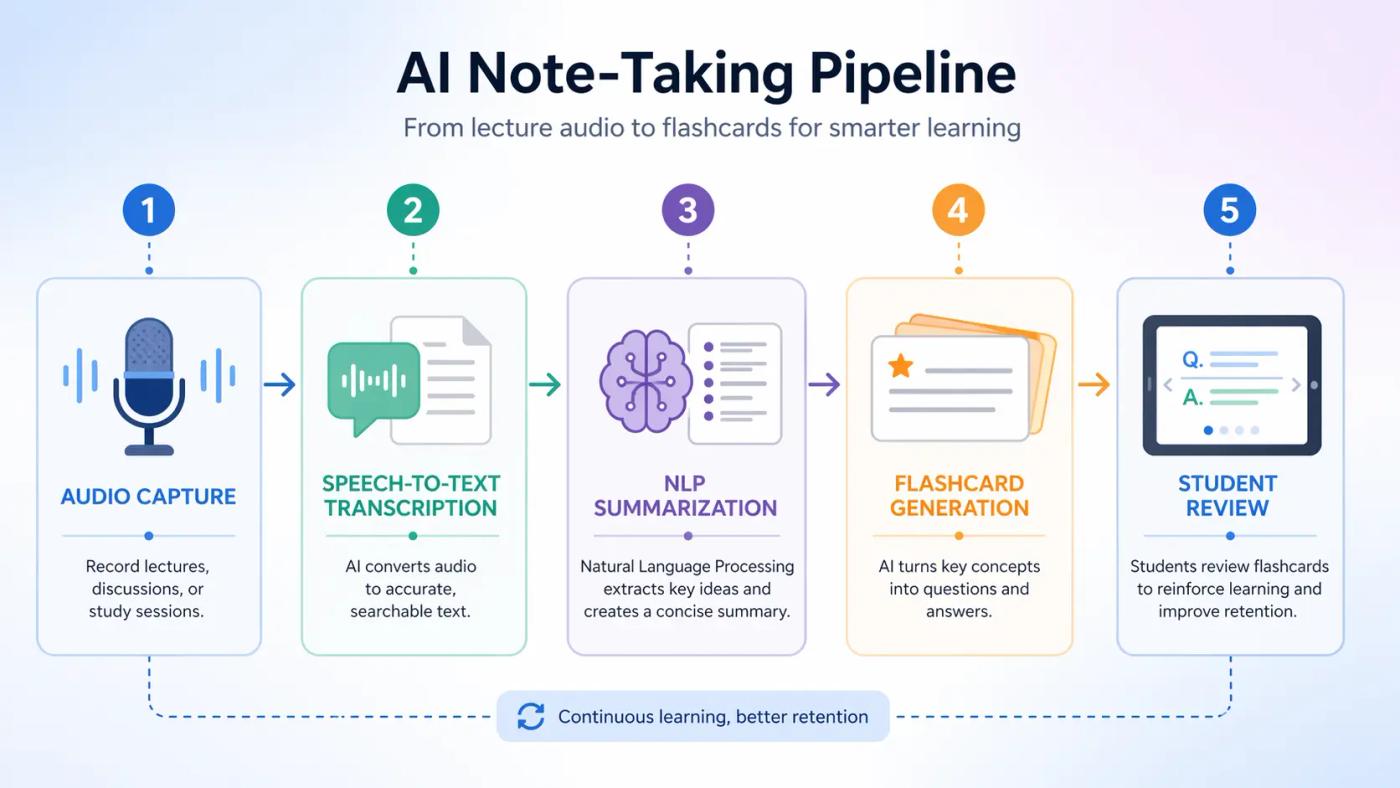
Understanding what happens between "record" and "study guide" helps you catch errors before they end up in your flashcards.
Step 1 — Audio Capture (Bot-Based vs. Device-Level)
Most tools capture audio one of two ways: a bot joins your Zoom or Teams call as a participant (Otter.ai, Fireflies, Fathom), or the app records directly from your device's microphone without joining as a visible attendee (Granola, Jamie, Goodnotes 6). Bot-based capture works well for online classes but can be blocked or flagged in some campus environments. Device-level capture is quieter and increasingly preferred for in-person lectures.
Step 2 — Speech-to-Text Transcription
The audio is converted to text using automatic speech recognition (ASR). On clean audio with a single speaker, modern tools typically hit 95–98% accuracy. That drops to roughly 85–92% in live lecture halls with background noise, strong accents, or fast-paced technical terminology. A transcript with 90% accuracy sounds reliable until you realize that's one error every ten words — enough to corrupt a definition or misattribute a key concept.
Step 3 — NLP Summarization and Key-Term Extraction
Once the transcript exists, natural language processing (NLP) models identify the most important sentences, group related ideas, and extract key terms. This is where tools diverge sharply. Stronger models (NotebookLM uses Gemini) produce coherent, contextually accurate summaries. Weaker implementations produce summaries that read fluently but miss the actual point of the lecture.
Step 4 — Study Material Generation (Flashcards, Quizzes, Guides)
The processed content feeds into study output: flashcards, multiple-choice quizzes, structured study guides, or audio overviews. NotebookLM's Learning Guide and Quiz features, for example, generate question sets directly from your uploaded sources rather than from generic topic databases — which means the questions reflect what your professor actually covered.
Step 5 — Review, Edit & Integrate with Your Workflow
No AI output skips human review without risk. Speaker misidentification, missed technical terms, and hallucinated summaries all pass through undetected if you treat the output as finished. The most effective workflow treats AI notes as a first draft: skim the transcript for errors, verify key definitions, then use the generated flashcards as a starting point rather than a final product.
Key Benefits: Why Students Are Switching to AI Notes
AI note-taking tools don't just save time they change what students are able to do during a lecture in the first place. When you're not furiously transcribing, you can actually listen, ask questions, and follow the argument being made. That shift alone is worth more than any feature on a spec sheet.
Time Saved vs. Manual Note-Taking
Organizing a full lecture's worth of handwritten notes into a reviewable study guide typically takes 45–90 minutes after class. A tool like NotebookLM or Otter.ai compresses that to under 10 minutes of review and editing. Over a 15-week semester with four courses, that's a realistic saving of 40–60 hours — time that goes back into actual studying, sleep, or both.
Accessibility & Accommodation Benefits
For students with ADHD, dyslexia, or auditory processing differences, AI note-taking isn't a convenience it's often the accommodation that makes full lecture participation possible. Tools like Glean and Genio are now formally recommended by disability services offices at institutions including UMass Amherst, specifically because they support multi-pass review: students can replay flagged moments, read the transcript, and engage with summarized output at their own pace. The Iowa Reading Research Center has noted that structured audio-plus-text review significantly supports reading comprehension for students with language-based learning disabilities.
📌 Pro Insight: If your college's disability services office doesn't yet have a formal AI note-taking accommodation policy, Glean and Otter.ai both provide institutional documentation to support accommodation requests worth asking about before the semester starts.
Better Exam Prep with Auto-Generated Flashcards & Quizzes
The real advantage of study-first tools shows up at exam time. Instead of building a Quizlet deck from scratch the night before a midterm, NotebookLM can generate a quiz set directly from your lecture uploads and course readings in under two minutes. The questions are grounded in your actual course material — not generic topic overviews pulled from the web.
⚠️ Common Mistake: Students often generate flashcards and assume they're ready to review. Active recall actually testing yourself without looking at the answer is what produces retention. The flashcard is the tool; the testing is the studying.
The Transcription Trap: Hidden Costs Every Student Should Know
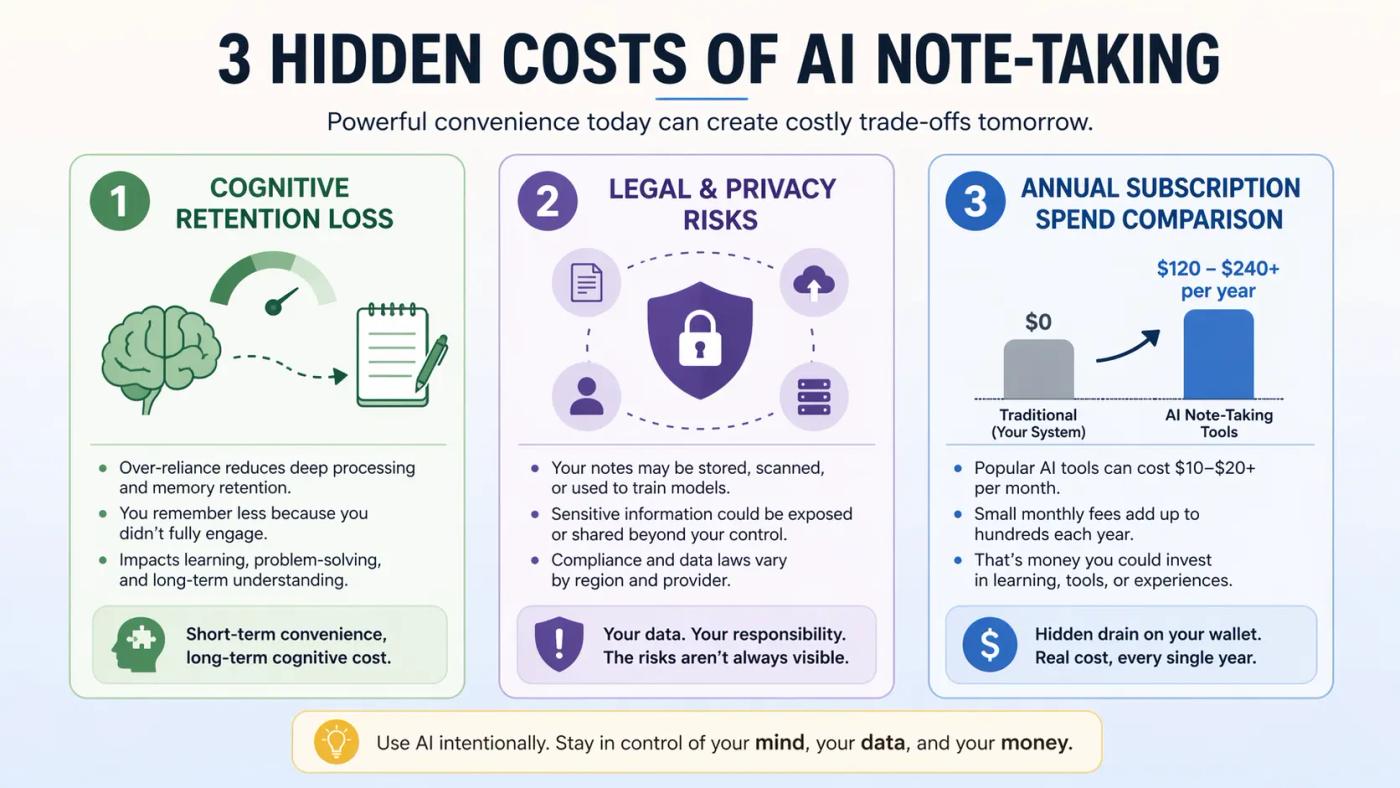
Every AI note-taking comparison list covers features and pricing. Almost none of them cover what you're quietly giving up in cognitive terms, legal exposure, and real annual spend. Here's what the listicles skip.
The Cognitive Cost: Why Verbatim Transcripts Can Hurt Retention
In a widely cited 2014 study published in Psychological Science, Mueller and Oppenheimer found that students who took notes by hand outperformed laptop note-takers on conceptual questions not because handwriting is magic, but because the slower pace forces selection and rephrasing, both of which drive deeper encoding. A 2021 replication by Urry et al. found attenuated effects, so the honest reading is that verbatim capture isn't automatically harmful. The risk is specific: if you treat an AI transcript as finished notes and never actively process the content, you've captured everything and learned considerably less than you think.
The tool produces the record. The learning still requires you.
💡 Expert Tip: Use AI transcription as a capture layer, not a study layer. After class, close the transcript and try to write down the three core ideas from memory. Then open the transcript to check and fill gaps. That single habit converts passive capture into active recall.
The Legal & Privacy Cost: Consent Laws, FERPA, and Classroom Recording
This is the area most students don't check until something goes wrong. Eleven to thirteen U.S. states currently require all-party consent before recording a conversation meaning recording a lecture without the professor's explicit permission may violate state wiretapping law, not just classroom policy. Harvard HUIT and Fordham University both updated their AI recording guidance in 2024–2025 to require prior instructor consent regardless of state law.
The privacy exposure runs deeper. An APA Blog post from March 2026 flagged that several AI note-taking platforms collect biometric voice data that falls outside standard FERPA protections, meaning your institution's privacy umbrella may not cover what a third-party app stores. The Brookings Institution's January 2026 report on AI in schools specifically identified opaque data retention policies as an underexamined risk for student users.
The practical rule: ask your professor before the first class, check your tool's data retention policy, and verify whether your state requires all-party consent.
The Subscription Cost: True Annual Spend in 2026
Free tiers disappear fast once you're managing four courses. Otter.ai Pro runs approximately $100 per year, reduced to around $80 with a verified .edu student discount (20% off). Notion Business the tier that unlocks full AI features sits at $240 per year, which adds up quickly relative to what students actually need. By contrast, Google NotebookLM remains free with no usage cap announced as of April 2026, Microsoft OneNote with Copilot is included at no cost in Microsoft 365 Education accounts, and both cover the majority of what most students need from an AI note-taking workflow without spending anything.
📌 Pro Insight: Before paying for any AI note-taking subscription, run your actual semester workload through NotebookLM's free tier for four weeks. Most students find it covers 70–80% of their needs before a paid tool becomes genuinely necessary.
Real-World Use Cases: Matching the Right Tool to Your Classes
The "best" AI note-taking tool is always the one that fits your actual class environment not the one with the longest feature list. Here's how the top picks map to the situations students actually face.
In-Person Lecture Halls (No Wi-Fi, Fast Pacing)
Otter.ai's mobile app records offline and syncs the transcript once you're back on a network, making it reliable for lecture halls with spotty connectivity. After class, upload the transcript or audio to NotebookLM for flashcard and quiz generation. This two-tool combination Otter for capture, NotebookLM for study output is the strongest free-first setup for traditional in-person courses.
Online Classes & Recorded Zoom Lectures
For Zoom-based courses, Tactiq pulls transcripts directly from the live caption stream without joining as a bot participant, which sidesteps most classroom recording policy concerns. Fathom and Zoom's native AI Companion are strong alternatives if your institution has Zoom licensed at the enterprise level. All three integrate with NotebookLM via export.
STEM, Math & Handwritten Work
Goodnotes 6 remains the clearest choice for students who need to mix typed notes with diagrams, equations, and handwritten derivations. Its AI Math Assistance layer checks handwritten calculations, and the Claude integration (added in late 2025) lets you ask questions about your own notes directly. No other tool in this category handles the handwriting-to-AI pipeline as cleanly.
Research-Heavy & Reading-Intensive Courses
NotebookLM is built for this scenario. Upload lecture notes, PDFs, and course readings into a single notebook, and the tool synthesizes across all sources simultaneously. The OpenStax integration means students in introductory science, economics, or social science courses can pull verified open-source textbook content directly no manual uploading required.
All-in-One Semester Workspace
Notion AI and OneNote with Copilot are the two strongest options for students who want a single environment for notes, assignments, deadlines, and AI summarization. OneNote wins on cost (free with any .edu Microsoft 365 account); Notion wins on flexibility and cross-device polish.
| Tool | Best For | Free Tier | Paid Price | Standout Feature |
|---|---|---|---|---|
| Google NotebookLM | Research + study material | Yes — unlimited | Free | Flashcards, quizzes, Learning Guide |
| Otter.ai | Live lecture capture | Yes — 300 min/month | ~$8/mo (Pro) | Real-time transcript + slide sync |
| Notion AI | All-in-one workspace | Limited | ~$10/mo (Plus) | Full workspace + AI summarization |
| Goodnotes 6 | STEM + handwriting | Limited | ~$10/year | AI Math Assistance + Claude integration |
| OneNote + Copilot | Microsoft ecosystem | Yes — via .edu | Free with M365 Edu | Native Copilot at no extra cost |
If you're building a full study system beyond just note-taking, see our guide to the best AI study tools for students on Smart Picks it covers the broader stack including AI writing, research, and revision tools.
7 Common Mistakes to Avoid (and Expert Fixes)
Most students don't get poor results from AI note-taking because they picked the wrong tool. They get poor results because of how they use it. These are the seven mistakes that consistently show up — and the fix for each.
- Recording without asking your professor first. Consent isn't optional in many states, and classroom policy can be stricter than state law regardless. Ask before the first session most professors say yes when asked directly, and many now have a standing policy posted in the syllabus.
- Treating the transcript as finished notes. A transcript is a capture layer, not a study layer. Raw transcription, even at 97% accuracy, contains misattributed terms, skipped context, and zero active recall. Always process before you review.
- Uploading copyrighted textbook PDFs to tools with unclear data policies. Several popular AI note-taking platforms retain uploaded content to improve their models. Check the data retention policy before uploading anything your institution licenses commercially. NotebookLM's data policy explicitly states that uploaded content is not used for model training.
- Paying for a premium tier before exhausting NotebookLM's free limits. NotebookLM supports up to 50 notebooks with 50 sources each as of early 2026 free, with no subscription required. Most students never hit that ceiling. Upgrade only when you have a specific feature gap the free tier genuinely can't cover.
- Ignoring your school's academic integrity policy on AI-generated study guides. Submitting AI-generated notes or outlines as original coursework crosses a line at most institutions, even if the underlying lecture was yours. Know where your school draws the distinction between AI-assisted studying and AI-assisted submission.
- Using one tool for everything. No single tool leads in capture, summarization, and study output simultaneously. A two-tool stack one transcription-first tool for capture, one study-first tool for review consistently outperforms any single-app approach.
- Skipping speaker tagging and summary review after the session. Unreviewed AI summaries carry errors forward into flashcards and quizzes. A five-minute review pass immediately after class while the lecture is still fresh catches the errors that would otherwise follow you into exam week.
⚠️ Common Mistake (bonus): Students who automate their entire workflow from capture to flashcard often discover during revision that they have no memory of the lecture itself. Automation is a productivity tool, not a learning tool. The two are not the same thing.
FAQ — AI Note-Taking Tools for Students Questions Answered
Which AI is best for taking notes in college?
Google NotebookLM is the strongest all-round pick for most college students in 2026. It's free, handles uploads from lectures and readings, and generates flashcards, quizzes, and study guides directly from your course material. For live lecture capture specifically, Otter.ai's real-time transcription and speaker tagging make it the better choice.
Is there a truly free AI note-taking app for students?
Yes. Google NotebookLM is free with no subscription tier and supports up to 50 notebooks with 50 sources each. Microsoft OneNote with Copilot is also free for any student with a .edu Microsoft 365 Education account. Both cover the core workflow capture, summarization, and study material generation without a paywall.
Is it legal to record lectures with an AI note taker?
It depends on your state and your professor's policy. Eleven to thirteen U.S. states require all-party consent before recording, which means recording without permission could violate state law regardless of classroom policy. The safest approach: ask your professor directly before the first session and check your institution's current AI recording guidelines.
Does using AI note-taking count as cheating?
Using AI to capture and organize your own lecture notes is generally not considered academic dishonesty. The line is submission: turning in AI-generated content as original coursework crosses most institutions' academic integrity policies. Always check your syllabus and your school's current AI use policy, which many universities updated in 2024–2025.
Do AI notes still need manual review?
Yes, always. Even at 95–98% transcription accuracy, errors accumulate across a full lecture misidentified terms, dropped context, and hallucinated summaries can all feed into your flashcards undetected. A five-minute review pass immediately after class is enough to catch the errors that matter before they reach your study materials.
Can AI note takers work offline or without Wi-Fi?
Otter.ai's mobile app records offline and syncs once reconnected, making it reliable for lecture halls with poor connectivity. Goodnotes 6 also works fully offline for handwritten capture. Most cloud-based tools including NotebookLM require an internet connection for processing and study material generation.
Is NotebookLM better than Notion AI for students?
For pure study output flashcards, quizzes, source-grounded summaries — NotebookLM is stronger and free. Notion AI wins if you need an all-in-one workspace that combines notes, task management, and deadlines in one environment. They serve different needs, and many students use both: NotebookLM for exam prep, Notion for semester organization.
Final Verdict: Your 2026 AI Note-Taking Starter Stack
You don't need to pay for anything to build a capable AI note-taking setup in 2026. The strongest free-first stack is straightforward: Google NotebookLM for study material generation, Otter.ai's free tier (300 minutes per month) for live lecture capture, and Microsoft OneNote with Copilot via your .edu account for semester-wide organization. Together, they cover capture, review, and exam prep without a subscription.
The one thing no tool covers for you is active processing. Transcription captures the lecture. Learning requires you to do something with it test yourself, restate concepts in your own words, connect new ideas to what you already know. The students who get the most from AI note-taking are the ones who use it to spend less time on logistics and more time on actual thinking.
Before committing to any paid plan, run your real workload through the free stack for four weeks. If a specific gap appears more upload storage, offline sync, deeper integrations that's the moment to upgrade. Not before.
The best tool is always the one that fits your classes, your device setup, and your local consent laws. Start simple, test with one course, and expand from there.
For students looking to extend this workflow beyond note-taking, our guide to no-code AI tools for productivity covers the next layer automation, scheduling, and AI-assisted task management that pairs well with the study stack above.
Related Articles


