n8n AI Automation Guide 2026: Real Cost, Use Cases & Benefits
n8n AI automation guide 2026 is not just about plan pricing — the real cost depends on deployment choice, self-hosting overhead, and workflow volume. This guide breaks down cloud vs. self-hosted setups, the hidden DevOps work most articles skip, and the real business use cases where n8n delivers the most value, so you can choose the right setup with a clear view of total cost.
n8n has become one of the most-discussed platforms in the workflow automation space and for good reason. As a practical n8n AI automation guide 2026, this article is built around the question most evaluators actually need answered: what does n8n genuinely cost, and is it the right tool for this team's situation?
Most articles stop at plan sticker prices. This one goes further. The full picture includes infrastructure choices, the operational overhead that comes with self-hosting, the billing model that sets n8n apart from task-based competitors, and the use cases where it delivers measurable value in production.
This guide is written for business owners and developers who are actively comparing automation platforms and need a clear-eyed assessment before committing not a feature list, but a practical evaluation framework.
By the end, the deployment path that fits the team's technical capacity, compliance requirements, and execution volume should be clear along with an honest view of what it will actually cost to run n8n in 2026.
Quick Summary: What You Need to Know About n8n
- n8n is a fair-code, open-source workflow automation and AI orchestration platform built for technical teams
- Two deployment options: n8n Cloud (fully managed, paid) and Community Edition (self-hosted, free license)
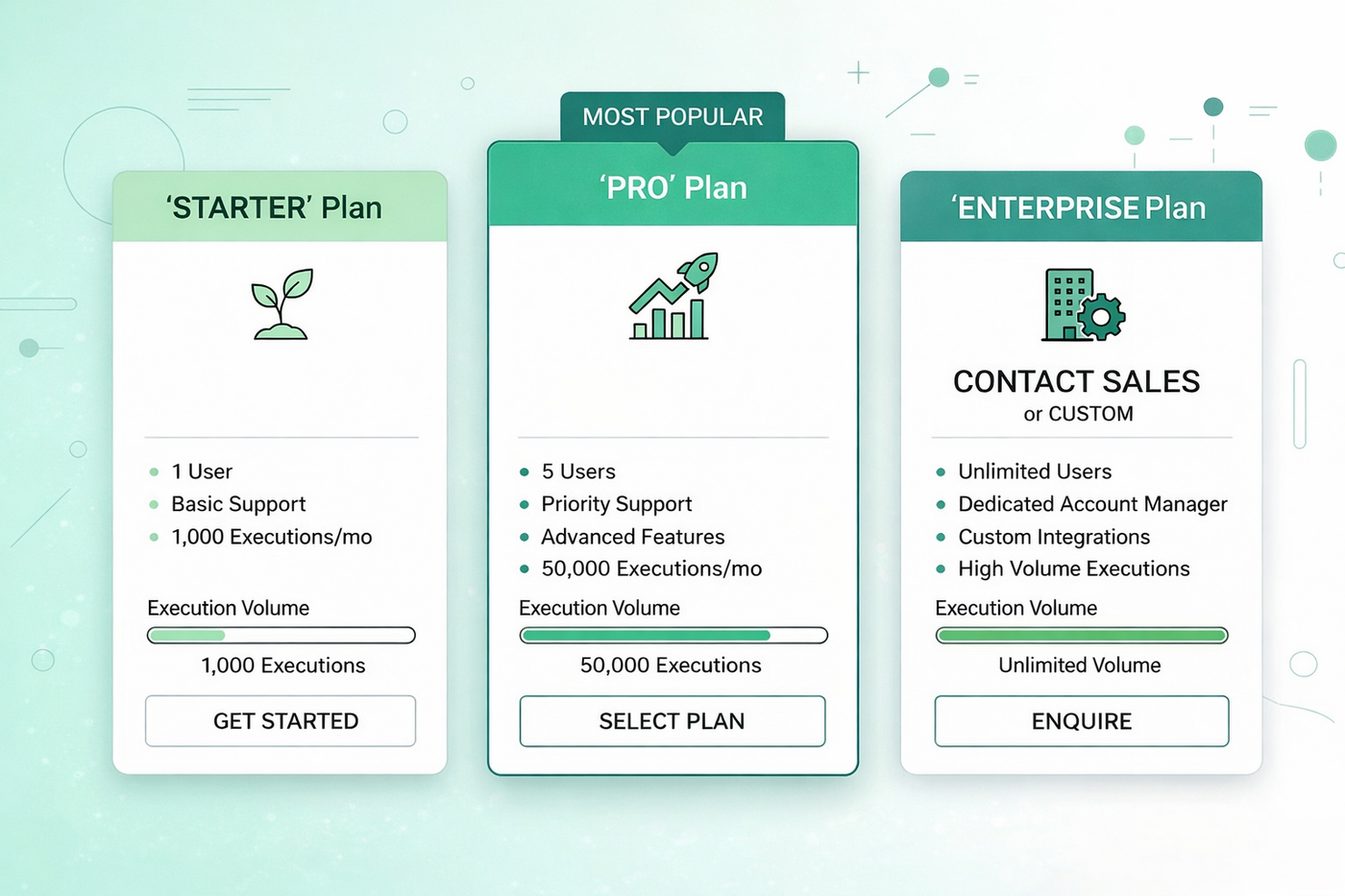
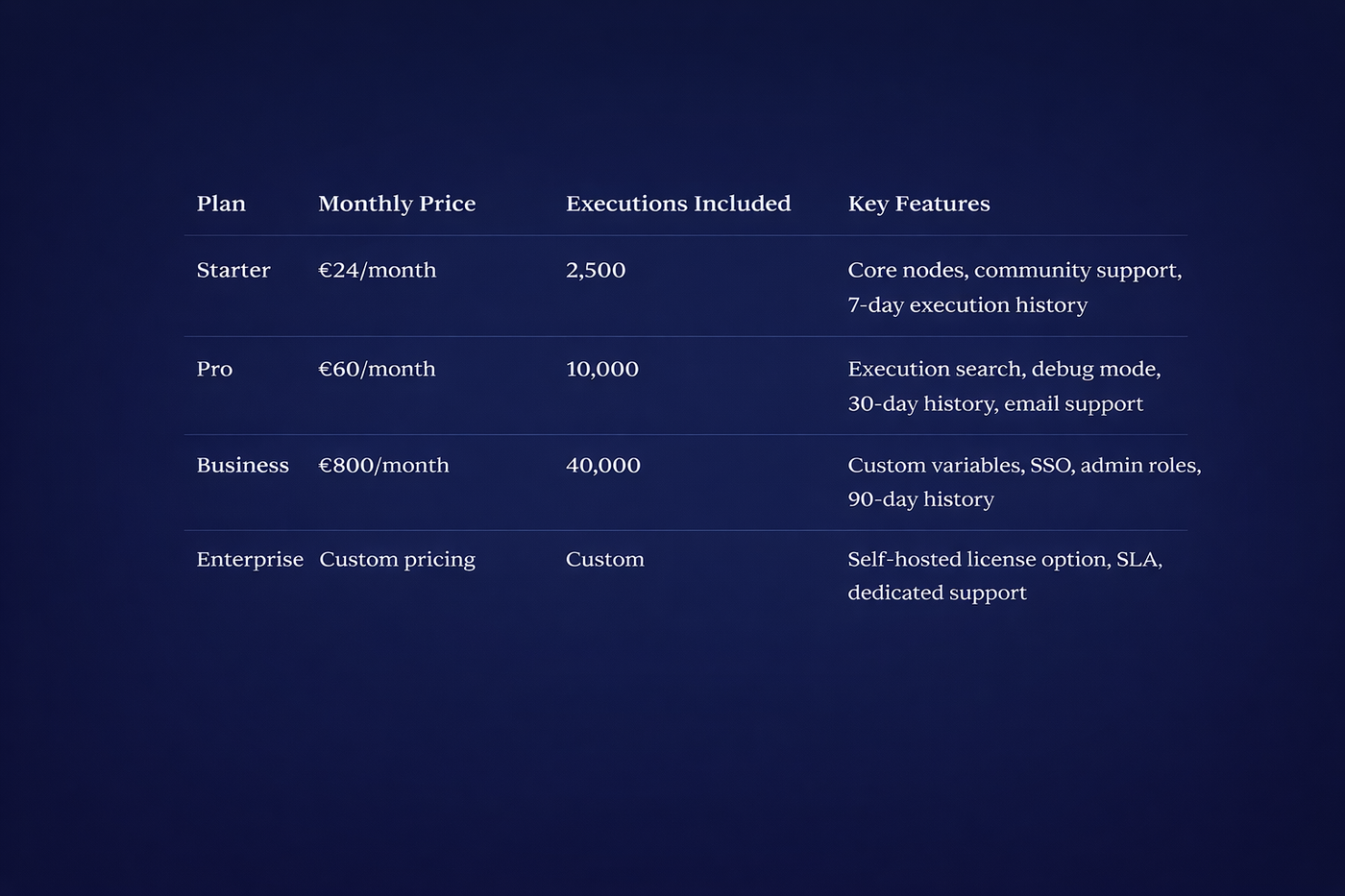
- Cloud pricing runs from €24/month (Starter) to €800/month (Business), with Enterprise pricing on request
- Self-hosted Community Edition carries no license fee, but infrastructure and maintenance costs apply
- Billing is execution-based one workflow run counts as one execution, regardless of how many steps it contains
- All 500+ integrations are included across every plan at no additional charge
- Best fit: developers, technical teams, and compliance-driven businesses handling sensitive data
- Not the right fit: non-technical teams who need zero setup, zero server management, and instant deployment
What Is n8n? The Open-Source Automation Platform Explained
n8n is a fair-code, open-source workflow automation and AI orchestration platform that lets teams build, run, and manage automated processes across hundreds of applications and APIs. The name is shorthand for "Nodemation" a reference to the node-based architecture at the core of how every workflow is constructed.
What separates n8n from most automation tools is its position between two extremes. Pure no-code platforms like Zapier prioritize simplicity fast setup, minimal configuration, and no technical knowledge required (covered in detail in our guide to the top no-code AI tools for productivity).
Fully custom-coded automation, on the other hand, offers complete flexibility but demands significant engineering time. n8n occupies the space between them: a visual canvas that operations and product teams can work with directly, combined with full JavaScript and Python support for developers who need logic that no drag-and-drop interface can handle.
This hybrid design is why n8n attracts both technical and semi-technical teams. Non-developers can build and maintain straightforward workflows without writing a line of code. Developers can drop into a code node wherever the visual builder reaches its limits.
The deployment question sits at the center of every n8n evaluation. n8n Cloud is a fully managed service n8n handles infrastructure, updates, and uptime. The Community Edition is self-hosted on infrastructure the team controls, available on GitHub with no license fee. That single choice drives the entire cost and compliance conversation this guide is built around, and it is covered in detail in the pricing and TCO sections ahead.
As of 2026, n8n also functions as a genuine AI workflow builder not just a connector between apps, but a platform capable of running multi-step AI agents alongside standard automation logic, within the same workflow canvas.
Inside n8n: How Nodes, Triggers, and AI Agents Work
Understanding n8n's architecture makes every downstream decision about use cases, costs, and deployment significantly easier. The platform is built around three core concepts: nodes, triggers, and workflow logic.
The Visual Node-Based Workflow Canvas
Every step in an n8n workflow is represented as a node. A node is a single unit of work it might pull data from an API, transform a value, send an email, write a record to a database, or run a block of JavaScript. Nodes are connected visually on a canvas, and data passes between them in a structured JSON format.
This canvas-based approach makes workflow logic visible at a glance. A team member who did not build the workflow can open it, follow the node sequence, and understand exactly what it does without reading code. For operations teams managing workflows across departments, that maintainability is a practical advantage that becomes more valuable as automation scales.
Triggers, Actions, and Branching Logic
Workflows in n8n are initiated by a trigger node. Triggers can be:
- Webhook-based — a workflow fires the moment an external system sends a POST request
- Schedule-based — workflows run on a cron schedule (hourly, daily, custom intervals)
- App event-based — a new row in Google Sheets, a form submission, an inbound email
Once triggered, action nodes execute in sequence. Conditional branching — the IF node splits the workflow path based on data values, letting teams build logic like: if deal stage equals "Closed Won," create invoice; if not, update CRM field and exit.
A real production example of this pattern: an inbound email arrives subject line and sender are extracted a CRM contact record is created or updated a Slack notification is sent to the account owner a follow-up email sequence is queued. That entire flow runs as a single execution.
Built-In AI Agent Nodes and LLM Integration
n8n's AI Agent node allows a language model to plan and execute multi-step tasks autonomously within a workflow not just generate text, but take action. The agent can query databases, call external tools, evaluate results, and loop until a defined goal is met.
Supported model providers include OpenAI, Anthropic, Cohere, and Hugging Face. For teams with strict data requirements, Ollama integration allows locally hosted models to run entirely on-premise no data leaves the server.
n8n also supports the Model Context Protocol (MCP), which allows AI agents within a workflow to call external tools and services in a standardized way. In 2026, MCP support positions n8n as one of the few automation platforms where AI agents and standard workflow logic share the same canvas without requiring separate infrastructure.
The Key Benefits of n8n for Business and Developers
n8n's core advantages are structural, not cosmetic. They stem from architectural decisions fair-code licensing, execution-based billing, and a self-hosting option that produce real, measurable differences in cost, control, and capability for the teams they suit best.
Full Data Control Through Self-Hosting
For businesses operating under data governance requirements, self-hosting n8n is not just a cost decision it is a compliance one.
- Workflow data, credentials, and execution logs never leave infrastructure the team controls
- GDPR and HIPAA compliance becomes achievable because data residency is fully defined by the team's own server configuration
- Business logic the actual automation rules and API credentials is never exposed to a third-party vendor
- Fintech, healthtech, and legal tech teams regularly cite data sovereignty as the primary reason for choosing n8n over cloud-only automation platforms
Cloud-only tools store workflow configurations, execution histories, and often API credentials on vendor-managed servers. For regulated industries, that arrangement introduces risk that self-hosting eliminates at the infrastructure level.
No Per-Operation Billing — One Execution, Any Complexity
n8n's execution model is one of its most financially significant features for high-volume teams.
- One workflow run = one execution, regardless of how many nodes the workflow contains
- A 50-step workflow running 1,000 times per month consumes 1,000 executions not 50,000 tasks
- Teams with complex, multi-step workflows avoid the billing multiplication that per-task models produce
- Execution quotas are predictable and scale linearly with workflow volume, not workflow complexity
This model rewards teams that build thorough, well-structured workflows rather than penalizing them for adding necessary logic steps.
500+ Native Integrations at No Extra Cost
- All integrations are available across every plan tier — no integration is paywalled to a higher plan
- Community-contributed nodes extend coverage beyond the native library
- Custom nodes can be built and installed via npm packages for any internal system or uncommon API
- The HTTP Request node provides a fallback for any service without a dedicated node if an API exists, n8n can connect to it
Native AI Agent Support With Local Model Option
- The AI Agent node can plan, execute, evaluate, and retry multi-step tasks autonomously
- Agents can query databases, call APIs, process documents, and loop until a defined output condition is met
- Ollama integration allows large language models to run entirely on local infrastructure AI processing stays on-premise if required
- For teams building RAG pipelines or internal knowledge base tools, n8n AI agents handle the orchestration layer without requiring a separate AI framework
n8n Pricing Plans 2026: Full Cost Breakdown Explained

n8n pricing operates on two tracks managed cloud plans billed by execution volume, and a self-hosted Community Edition with no license fee. Understanding both tracks, and what each one actually costs in practice, is the foundation of any honest deployment decision.
n8n Cloud Plans at a Glance
As of 2026, n8n Cloud offers four tiers. All plans include unlimited users, unlimited workflows, and the full 500+ integration library. A March 2026 update removed active workflow limits across all plans previously a constraint on lower tiers.

Annual billing reduces the monthly rate by approximately 17% across all Cloud plans. Additional executions beyond the included quota can be purchased on top of any plan without upgrading tiers.
Self-Hosted Community Edition: Free, But Not Zero Cost
The Community Edition is available on GitHub under n8n's fair-code license. There is no license fee, no execution cap, and no restriction on workflow count. For teams with the technical capacity to manage it, that makes it the highest-value deployment option on paper.
The real costs are infrastructure, not software:
- VPS hosting: A basic server from providers like Hetzner or DigitalOcean runs €4–€10/month. The minimum recommended specification for moderate workflow loads is 2 vCPU and 4 GB RAM
- Database hosting: n8n requires a PostgreSQL database in production. This can run on the same VPS or as a managed service, adding €0–€15/month depending on the approach
- SSL certificate: Free via Let's Encrypt, but renewal and configuration require setup time
- Off-site backups: Essential for production deployments. Budget €2–€5/month for a basic backup solution
- Monitoring: Uptime monitoring via tools like Uptime Robot (free tier) or a paid observability stack depending on team requirements
Realistic all-in infrastructure costs for a self-hosted production instance: €15–€70/month, depending on workflow volume and the monitoring stack in place. Those figures cover hardware and services only they do not account for the operational time cost covered in the next section.
Execution-Based Billing vs. Per-Task Pricing (Context Only)
To illustrate why the billing model matters for cost estimation, consider this calculation:
A 10-step workflow running 1,000 times per month generates:
- Under execution-based billing (n8n): 1,000 executions
- Under per-step/task billing: 10,000 tasks
For teams running complex workflows at volume, that difference compounds quickly. A team running five such workflows at the same frequency would consume 5,000 executions under n8n's model — comfortably within the Pro plan — versus 50,000 task events under a per-task model.
This calculation is most relevant during platform evaluation, when estimating which plan tier covers actual usage. Teams with simple, low-step workflows will see less difference between models. Teams with high-node-count workflows running at meaningful volume will see the gap widen significantly.
What Most n8n Pricing Guides Don't Tell You About Costs

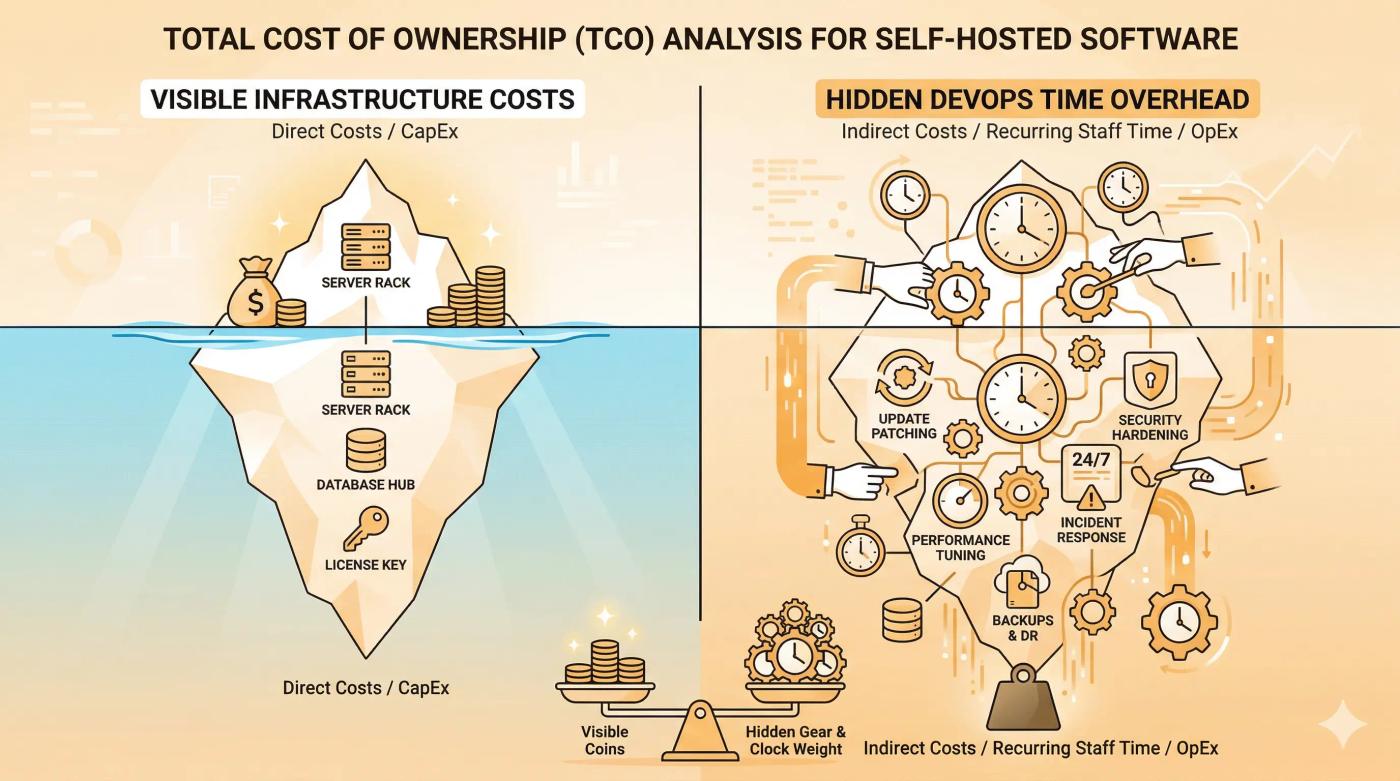
Infrastructure costs are easy to find. The operational time cost of running n8n in production is almost never quantified and for many teams, it is the number that determines whether self-hosting actually saves money.
The Hidden DevOps Time Cost of Self-Hosting
Running n8n on a self-hosted server is not a one-time setup task. Production deployments require ongoing maintenance, and that maintenance takes time. Based on n8n's own documentation and independent infrastructure analyses, teams should budget 10–20 hours per month of DevOps time to keep a self-hosted instance running reliably.
That time is distributed across:
- Server and container updates — n8n releases updates regularly. Each update requires pulling the new Docker image, testing for breaking changes, and redeploying without workflow downtime
- Database management — PostgreSQL requires periodic vacuuming, index maintenance, and query performance checks as execution history grows
- Backup verification — Scheduled backups need to be tested, not just configured. An untested backup is not a backup
- SSL renewal and configuration — Let's Encrypt certificates expire every 90 days. Automated renewal via Certbot works until it doesn't, and a lapsed certificate takes workflows offline
- Security patching — The underlying OS, Docker engine, and any exposed services require regular patching to close known vulnerabilities
- Incident response — When a workflow fails silently or a server goes unresponsive, investigation and recovery falls entirely on the team
At a conservative internal billing rate of €50/hour, 10 hours of monthly DevOps time adds €500 to the real monthly cost of self-hosting — a figure that does not appear in any infrastructure cost estimate.
When Self-Hosting Saves Money — And When It Costs More
Self-hosting makes clear financial sense under a specific set of conditions:
- The team already has a DevOps engineer or a technically capable developer with available capacity
- Infrastructure overhead is a marginal addition to existing server management work not a new function being created
- Execution volume exceeds approximately 7,000–10,000 executions per month, making Cloud plan costs material
It becomes the more expensive option when:
- A non-technical team or a small startup without DevOps headcount absorbs the maintenance burden in engineering hours that would otherwise go to product work
- Incidents during off-hours require emergency response from team members not dedicated to infrastructure
- The €36/month difference between self-hosting infrastructure and the Starter Cloud plan is less valuable than the time it replaces
The honest calculation is not infrastructure cost versus plan cost. It is total operational cost — infrastructure plus the fully-loaded cost of the time required to manage it versus the Cloud plan that covers equivalent execution volume.
A Simple Framework for Choosing Your Deployment Path
Three questions determine the right deployment option for most teams:
- Does your team have someone comfortable managing Docker, a Linux VPS, and routine server maintenance? If no — n8n Cloud is the lower-risk, lower-total-cost option regardless of plan price.
- Do you handle data subject to GDPR, HIPAA, or strict internal data governance requirements? If yes self-hosting or an Enterprise license with self-hosted deployment deserves serious evaluation, as data residency and vendor access become compliance variables, not just preferences.
- Are you expecting to scale past approximately 10,000 monthly executions with complex, multi-step workflows? If yes model the total cost of the Business Cloud plan against a self-hosted instance managed by existing technical headcount. At that volume, the infrastructure investment has a credible return.
Teams that answer yes to all three questions are strong candidates for self-hosting. Teams that answer no to question one should default to Cloud, regardless of execution volume.
Real-World n8n Use Cases That Replace Manual Workflows

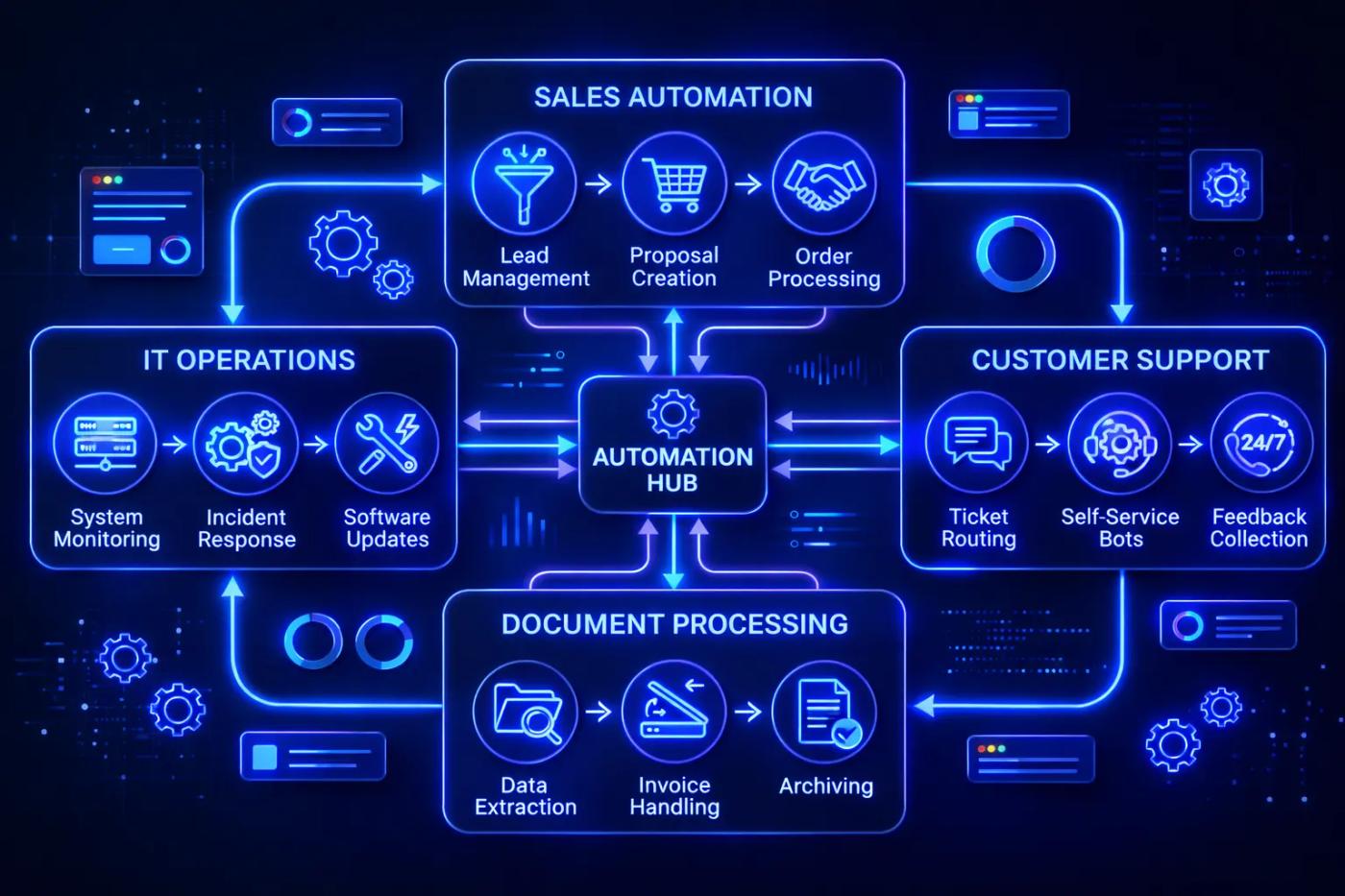
The strongest argument for any automation platform is not its feature list it is the specific work it eliminates. The use cases below represent production patterns that teams are running on n8n in 2026, covering the four areas where the platform consistently delivers the clearest return on setup time.
Sales and CRM Lead Automation
Manual lead handling is one of the highest-friction points in early-stage sales operations. A single n8n workflow can replace the entire data entry and notification loop:
- Inbound lead captured from a web form or landing page
- Contact record created or updated in the CRM automatically
- Lead enriched via a third-party data API to append company size, industry, and contact details
- Account owner notified in Slack with enriched context included
- Follow-up email sequence queued based on lead source or deal stage
This pattern eliminates manual SDR data entry entirely, reducing the window between lead capture and first contact from hours to seconds.
IT Operations and Internal System Sync
- Employee onboarding and offboarding flows account provisioning, access requests, and deprovisioning triggered by an HRIS event
- Infrastructure alert routing alerts from monitoring tools like Datadog or PagerDuty are enriched with ontext before being routed to the correct on-call contact
- ERP-to-application data sync keeping inventory, billing, and customer records consistent across systems without manual exports
Vodafone's internal security team attributed £2.2 million in operational savings to n8n-based threat intelligence workflows, according to n8n's published case studies — a directional indicator of the scale achievable in enterprise IT contexts.
AI-Powered Document and Data Pipelines
- Invoice processing inbox monitoring detects a new invoice, AI extracts line items and totals, validation logic checks against purchase orders, approval routing sends to the correct approver, and confirmed invoices post directly to the ERP
- Document summarization pipelines for legal, compliance, and research teams
- RAG (Retrieval Augmented Generation) pipelines that feed internal knowledge bases documents are chunked, embedded, and stored in a vector database automatically as new content is added
Customer Support and Ticket Triage
- Incoming support tickets are classified by topic and urgency using an AI Agent node
- High-priority tickets are routed immediately to senior agents; standard tickets enter the normal queue
- First-response drafts are generated automatically and held for agent review before sending
- Escalation logic triggers when a ticket remains unresolved past a defined threshold
Koralplay, a gaming payments company, documented 70% automation of their payment support ticket volume using n8n workflows reducing manual handling time and response latency simultaneously, per n8n's published case study record.
The Most Common n8n Mistakes and How to Avoid Them
These are the errors that cause the most production failures, wasted execution quota, and avoidable maintenance time across both Cloud and self-hosted deployments.
- Not configuring an Error Workflow before going to production. n8n allows a dedicated Error Workflow to be set under Settings → Error Workflow. Without it, failed executions surface only in the execution log — not in real time. Configure an Error Workflow that sends a Slack message or email on failure before any workflow goes live.
- Choosing self-hosting without auditing available DevOps time. The infrastructure cost is easy to calculate. The time cost is not. Before committing to self-hosting, identify who will own updates, incident response, and database maintenance and confirm they have the capacity.
- Running production workflows on Render's free tier. Render's free tier spins down inactive containers after periods of inactivity. Scheduled workflows that fire while the container is spinning back up fail silently. Production deployments require a server that stays running continuously.
- Building looping workflows without rate limiting or wait nodes. Loops without exit conditions or throttling either exhaust execution quota rapidly or trigger infinite loops. Every loop in a production workflow needs a defined exit condition and a Wait node to control request frequency.
- Hardcoding credentials directly inside workflow nodes. n8n includes a built-in credential manager. Credentials stored there are encrypted and reusable across workflows. Hardcoded values in nodes are a security risk and a maintenance problem when credentials rotate.
- Skipping execution history review during debugging. The execution search and history panel available from the Pro plan upward is the fastest way to diagnose workflow failures and document automation behavior for compliance purposes. Teams that skip it spend significantly longer troubleshooting production issues.
- Attempting to automate every process at once. The highest-ROI approach is to identify the single most time-consuming manual workflow first, automate it completely, and validate it in production before expanding. Broad automation attempts spread across too many workflows simultaneously tend to produce partially-built, unmaintained flows.
n8n FAQ: Real Answers for Business Owners and Developers
Is n8n free to use?
The Community Edition is free to self-host with no license fees and no execution limits. n8n Cloud plans start at €24/month. Self-hosting is free in license cost but carries real infrastructure and operational overhead that should be calculated before choosing that path.
How much does it really cost to self-host n8n in production?
Infrastructure runs €4–€10/month on a basic VPS. Adding database hosting, backups, and monitoring brings realistic all-in costs to €15–€70/month depending on workflow volume. DevOps maintenance time typically 10–20 hours/month is the cost most estimates leave out entirely.
Is n8n better than Zapier for complex workflows?
For technically capable teams running high-volume or multi-step workflows, n8n's execution-based billing is significantly more cost-efficient. Zapier remains the faster, simpler choice for non-technical teams where setup speed and ease of use outweigh cost control.
Does n8n support AI agents and large language models?
Yes. n8n includes native AI Agent nodes, LangChain integration, and support for OpenAI, Anthropic, Cohere, Hugging Face, and local models via Ollama. AI steps run directly on the same workflow canvas as all other automation logic no separate infrastructure required.
Is n8n suitable for non-technical users?
n8n Cloud can handle simple workflows with minimal technical knowledge. Self-hosting requires comfort with Docker, Linux server management, and environment configuration. n8n's own documentation recommends self-hosting for technically experienced users only.
Can n8n meet GDPR or data compliance requirements?
Self-hosted deployments store all data on infrastructure the team controls, making GDPR and HIPAA compliance achievable. n8n Cloud hosts data in Frankfurt, EU. Compliance depends on deployment configuration and internal data handling practices not the platform alone.
Choosing the Right n8n Deployment Path in 2026
n8n delivers genuine value in 2026 but only when the deployment decision is made honestly. The platform's technical depth, execution-based billing, and self-hosting option make it one of the strongest choices available for developers and data-sensitive businesses. Those same characteristics make it the wrong choice for teams without the technical capacity to support it.
The framework this guide has laid out reduces that decision to three variables: DevOps capacity, data governance requirements, and execution volume. Teams that have all three answered clearly will find the right path without overpaying for Cloud or underestimating the real cost of self-hosting.
The recommended next step depends on where the evaluation currently stands:
- Developers and technical teams deploy the Community Edition on a low-cost VPS from Hetzner or DigitalOcean and run a real workflow in production before making any further commitment. The infrastructure investment is minimal and the learning is immediate.
- Business owners evaluating at scale start with n8n's 14-day Cloud trial before committing to self-hosting. Validate use cases and execution volume on a managed instance first, then reassess the deployment model with real data.
- Enterprise teams — contact n8n sales directly for an Enterprise license, which includes self-hosted deployment with dedicated support and an SLA — removing the operational burden while retaining data sovereignty.
If you are still evaluating whether AI automation is right for your business overall, this guide to AI automation for businesses covers the full decision framework.