

How to Use ChatGPT for Daily Life
Most ChatGPT guides hand you a list of fun prompts and call it a day. This one covers the full lifecycle: setup, real daily prompts, privacy settings, billing fixes, workplace detection risks, and a clean exit plan. You will finish knowing how to use ChatGPT for daily life without the blind spots.

About one in three U.S. adults have now tried ChatGPT, roughly double the number from two years ago Pew Research Center. But most guides on how to use ChatGPT for daily life stop at a list of fun prompts. They skip the parts that actually matter: safety, billing problems, workplace detection risks, and what to do when you want to stop.
This guide covers the full lifecycle. You will learn how to set up an account, build real prompts for your morning, afternoon, and evening routines, protect your privacy, fix payment failures, keep AI-assisted work natural, and delete everything cleanly if you decide ChatGPT is not for you.
What ChatGPT Actually Is and What It Cannot Do
ChatGPT is an AI chatbot built by OpenAI. It runs on a large language model (the current family is GPT-5) that predicts what word comes next based on patterns learned during training. It does not look up facts in a database or search the internet by default.
That pattern-based design is both its strength and its biggest limitation. ChatGPT can draft emails, explain difficult concepts, brainstorm ideas, and summarize long documents in seconds. But it can also "hallucinate," meaning it sometimes produces confident-sounding answers that are flat-out wrong. This happens most often with specific facts, dates, statistics, and citations.
The truth is, ChatGPT works best as a thinking partner, not a fact-checker. It is excellent at organizing your thoughts, generating first drafts, and walking through problems step by step. Just verify anything important before you act on it.
How to Set Up ChatGPT in Under 5 Minutes
Getting started is simple, and this quick walkthrough covers how to use ChatGPT for beginners with zero technical knowledge.
- Go to chatgpt.com and click "Sign up."
- Create an account using your email address, Google login, or Apple ID.
- Verify your email by clicking the confirmation link OpenAI sends you.
- Add a phone number for security verification. OpenAI requires this for all new accounts.
- Choose a plan. ChatGPT offers four main tiers for individuals: Free (with ads, limited messages), Go at $8/month (more messages, still has ads), Plus at $20/month (full features, no ads), and Pro at $200/month (maximum power and model access).
For casual daily use, the Free plan is enough to start. You can always upgrade later if you hit the message limits regularly.
Practical Ways to Use ChatGPT for Daily Life
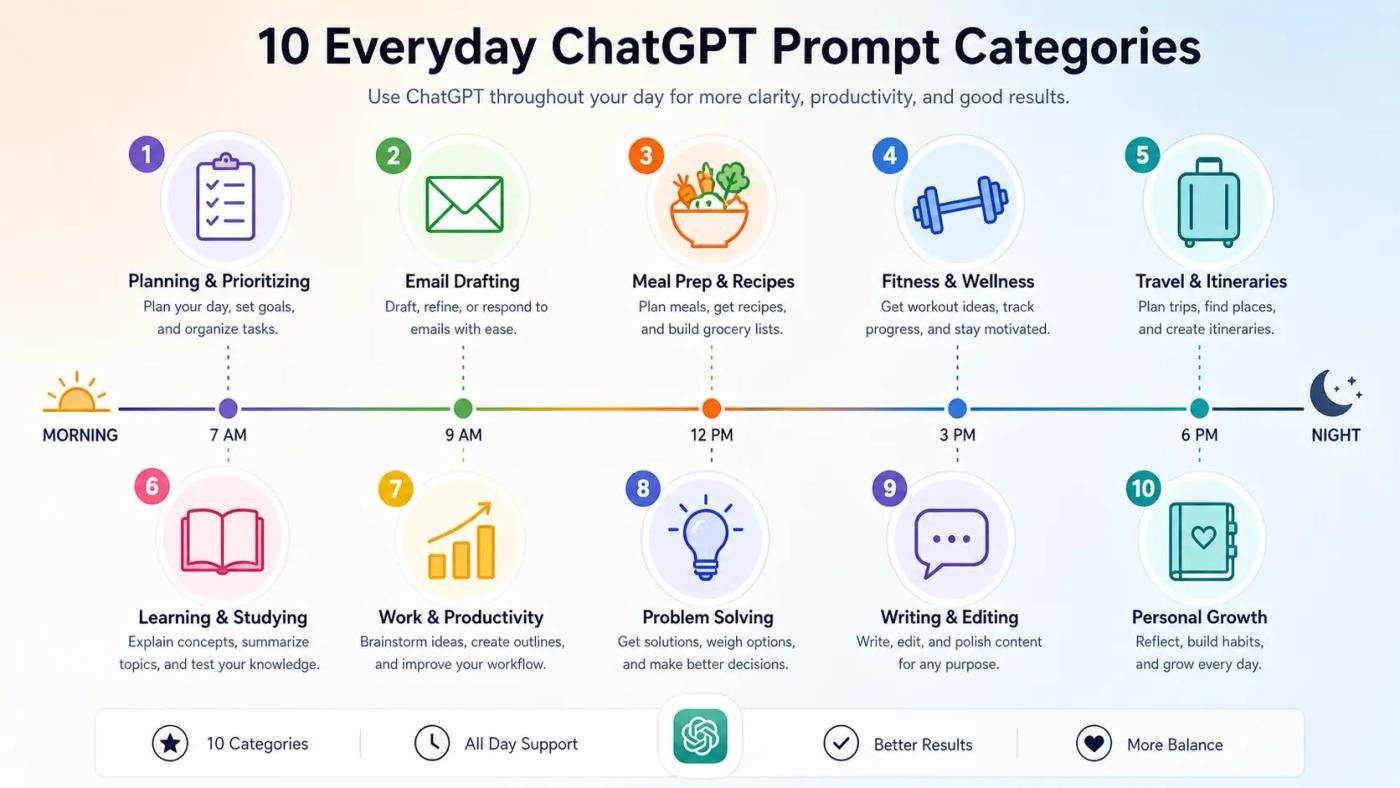
The best chatgpt prompts for everyday life follow a simple pattern: give ChatGPT a clear role, a specific task, and the format you want back. Below are 10 ready-to-use prompts organized by time of day, covering the most practical ways to use chatgpt at home and beyond.
Morning and Afternoon Prompts
- Daily planning: "Act as a productivity coach. Here are my 6 tasks today: [list them]. Prioritize by urgency and energy level, then suggest a time-blocked schedule."
- Email drafting: "Rewrite this email to sound professional but friendly. Keep it under 100 words: [paste your draft]."
- Meal prep: "I have chicken thighs, rice, broccoli, and soy sauce. Give me a 30-minute dinner recipe with exact measurements for two servings."
- Quick learning: "Explain how compound interest works like I'm 15 years old. Include one real-world example."
- Meeting recap: "Summarize these meeting notes into 5 bullet points, each with one action item and a deadline: [paste notes]."
Evening and Weekend Prompts
- Home workout: "Create a 30-minute beginner bodyweight workout I can do at home with no equipment. Include warm-up and cool-down."
- Travel planning: "I'm planning a 4-day trip to Lisbon on a $1,500 budget. Give me a day-by-day itinerary with estimated costs per activity."
- Errand routing: "I need to visit the bank, grocery store, post office, and pharmacy, all within 3 miles of [your address]. What's the most efficient route order?"
- Gift brainstorm: "Suggest 5 birthday gift ideas under $40 for a 30-year-old who enjoys hiking and photography."
- Weekend deep-dive: "Explain how solar panels convert sunlight into electricity. Keep it beginner-friendly, under 200 words."
Each prompt works because it tells ChatGPT exactly what you need and how to format the answer. Swap in your own details and iterate on the first reply. If you want to automate repetitive daily tasks without coding, explore no-code AI tools for productivity that connect ChatGPT to your calendar, email, and other apps.
Is ChatGPT Safe to Use?
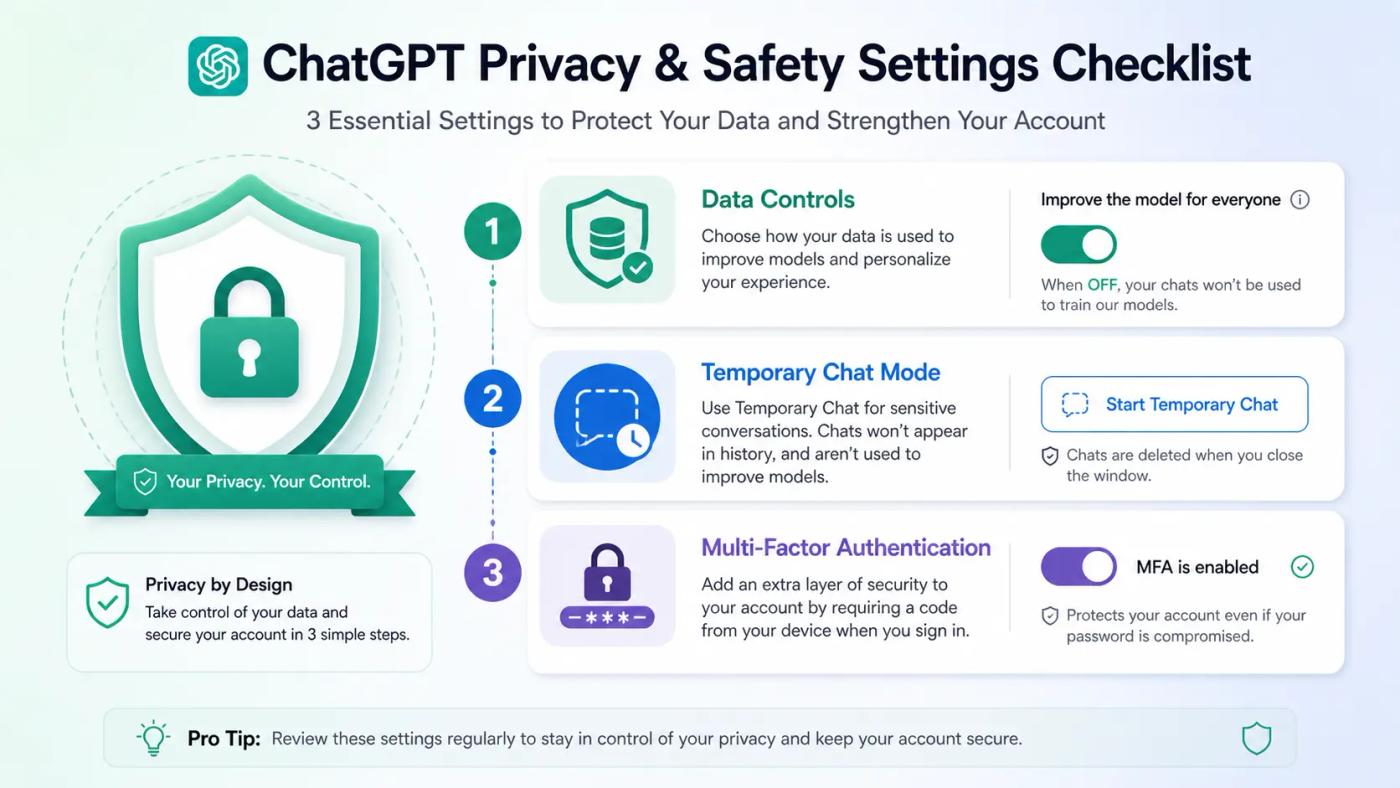
Yes, ChatGPT is generally safe for everyday tasks like brainstorming, drafting, and learning. However, your conversations may be used to train future models unless you change one setting. OpenAI stores your chat history on its servers, and the FTC's AI oversight page flags transparency and data handling as key concerns for all chatbot providers.
What to Never Share With ChatGPT
Avoid entering passwords, financial account numbers, medical records, confidential work documents, or anything you would not want stored on a remote server. Even with privacy settings enabled, your input still passes through OpenAI's systems. Treat the chat window like a public notebook, not a private vault.
Privacy Settings Every User Should Change
Open Settings → Data Controls and turn off "Improve the model for everyone." This stops your conversations from being used in training. For sensitive one-off questions, use Temporary Chat, which keeps nothing in your history and excludes the conversation from training entirely. Finally, enable multi-factor authentication (MFA) under your account security settings to protect against unauthorized access. For a full breakdown of available toggles, see OpenAI's Data Controls FAQ.
Does ChatGPT Use Your Computer Resources?
No. ChatGPT runs entirely on OpenAI's cloud servers, not on your device. When you type a prompt, your browser or app sends the text to OpenAI's data centers, where the model processes it and streams the response back. Your computer, phone, or tablet only handles displaying that text on screen.
That said, your device does use some local resources to keep the chat running. The browser tab typically consumes a few hundred megabytes of RAM, and that number climbs during long conversations with heavy formatting or images. You may also notice a small spike in CPU usage while responses are actively streaming in.
If ChatGPT ever feels sluggish, close any chat tabs you are not actively using. This frees up browser memory and usually solves the problem immediately.
ChatGPT Plus Payment Declined — Quick Fixes
Payment failures during a ChatGPT Plus upgrade are common, and they usually have nothing to do with your balance. OpenAI processes subscriptions through Stripe, which sometimes flags international cards, triggers bank-side fraud filters, or fails 3D Secure verification silently. Here is how to fix it.
- Read the exact error message. "Card declined" and "authentication required" have different causes. Screenshot it before doing anything else.
- Call your bank first. Ask them to authorize charges from "OpenAI" or "Stripe." Many banks block unfamiliar international transactions by default.
- Stop retrying immediately. Multiple failed attempts can trigger a temporary lockout on Stripe's side, making the problem worse.
- Try the in-app purchase route. Subscribe through the ChatGPT iOS or Android app instead. Apple Pay and Google Pay often bypass the card issues entirely.
- Use a different card. A second card from another bank frequently works on the first try.
- Consider ChatGPT Go as a fallback. At $8/month, the Go plan lets you start using paid features while you sort out the Plus payment issue.
How the Use of ChatGPT Becomes Obvious at Work
Roughly 28% of employed U.S. adults now use ChatGPT on the job (Pew Research). But careless use leaves recognizable patterns that colleagues and managers spot quickly. The biggest giveaway is not output quality; it is the sudden mismatch between someone's usual writing style and what they submit.
Common Signs That Flag AI-Written Work
- A sudden shift to overly polished, formal prose that sounds nothing like the person's usual tone
- Missing internal context, project names, or team-specific language only a human insider would know
- Repetitive structure: every message opens with a summary, follows with three bullet points, and ends with a generic wrap-up
- Filler phrases like "it's important to note" and "several key factors to consider"
How to Keep AI-Assisted Work Natural
Edit aggressively before sending anything. Add project names, internal references, and details only someone on your team would include. Break the default bullet-list format by mixing in short paragraphs and direct opinions. Read the final version aloud; if it sounds like a press release instead of a message from you, rewrite the stiff parts.
These same tells appear in academic settings. Students using AI note-taking tools face similar scrutiny from instructors watching for abrupt quality shifts.
What If You Want to Stop Using ChatGPT?
Leaving ChatGPT cleanly takes three steps: export your data, cancel any paid subscription, and delete your account. The entire process takes under 10 minutes, but the order matters. Deleting your account before canceling a mobile subscription can leave charges running silently.
- Export your data first. Go to Settings → Data Controls → Export Data. OpenAI will email you a download link with your full conversation history and uploaded files.
- Cancel your subscription. On the web, go to Settings → Subscription → Cancel. If you subscribed through the iOS App Store or Google Play, you must cancel there separately.
- Delete your account. Go to privacy.openai.com, click "Make a Privacy Request," and select "Delete my ChatGPT account." You can also delete from Settings → Account → Delete Account inside ChatGPT. OpenAI removes your data within 30 days.
One detail most guides skip: OpenAI limits each phone number to three accounts total, and deleted accounts still count toward that cap. Deleting does not free up a slot.
Tips to Get Better Results From ChatGPT Every Day
Here's the thing: most people type a vague question, accept the first reply, and wonder why ChatGPT feels generic. The fix is how you prompt.
Start every prompt with three elements: a role ("Act as a meal planner"), context ("I'm cooking for two on a $50 weekly grocery budget"), and a format ("Give me a 5-day dinner plan in a table"). This structure alone improves output quality dramatically.
💡 Expert Tip: Turn Custom Instructions on under Settings → Personalization. Add your preferences once (tone, language, job role), and every future conversation starts with that context built in.
💡 Expert Tip: Use Memory for ongoing projects so ChatGPT recalls past conversations. Turn it off for one-off questions, and switch to Temporary Chat for anything sensitive.
⚠️ Common Mistake: Treating ChatGPT like a search engine. It is not built for factual retrieval. It is built for thinking through problems, generating drafts, and organizing ideas. Never outsource your judgment on consequential decisions like medical, legal, or financial choices.
When a response falls short, do not start over. Reply with "Make it shorter" or "Try a different angle." Iteration beats restarting every time.
FAQ — How to Use ChatGPT for Daily Life Questions Answered
How do I start using ChatGPT for the first time?
Go to chatgpt.com and click "Sign up." You can register with your email address, Google account, or Apple ID. After verifying your email and adding a phone number for security, you can start chatting on the Free plan right away.
Is ChatGPT free to use in 2026?
Yes. OpenAI offers a Free plan with limited messages and ads in the U.S. Paid options include Go at $8/month, Plus at $20/month, and Pro at $200/month. The Free tier covers casual daily use without spending anything.
Can I use ChatGPT without creating an account?
Yes, but with restrictions. Visit chatgpt.com and start chatting without logging in. You lose access to chat history, file uploads, image generation, voice mode, and Custom Instructions. For regular use, a free account takes two minutes and removes all limits.
What can ChatGPT not do?
It cannot browse the web in real time unless search is turned on, verify facts with certainty, run programs on your device, or replace professional advice in medicine, law, or finance. It also hallucinates, producing confident answers that are sometimes wrong.
What is the difference between ChatGPT and ChatGPT Plus?
The Free plan offers limited daily messages, shows ads, and runs on an older model. Plus at $20/month removes ads, provides access to the latest GPT-5 models, and adds Deep Research, image generation, voice mode, and significantly higher message limits.
How do I delete my ChatGPT account permanently?
Visit privacy.openai.com, click "Make a Privacy Request," and select "Delete my ChatGPT account." You can also delete from Settings → Account inside ChatGPT. OpenAI removes your data within 30 days. Cancel any App Store or Google Play subscription separately before deleting.
Conclusion
ChatGPT works best when you treat it as a quiet daily utility, not a magic box. Set it up once, adjust your privacy settings, and keep your expectations grounded in what it actually does well: drafting, organizing, and thinking through problems alongside you.
If it stops being useful, you now know exactly how to walk away cleanly.
Pick one prompt from the daily use section and try it tomorrow. That single test will tell you more than any guide can.
Related Articles


