

10 Best AI Study Tools for Students in 2026
Most "best AI tools" lists are thinly disguised ads stacking paid subscriptions no student can afford. This guide compares 10 AI study tools for students in 2026 with real prices, free alternatives that actually work, and ready-to-use workflows for essays, exams, and STEM problem solving.

There are hundreds of AI tools claiming to help you study better. Most listicles ranking them read like sponsored ads, stacking paid subscriptions without mentioning what they will actually cost you per semester.
This guide cuts through that noise. We compared the best AI study tools for students across research, writing, note-taking, and exam prep to build a shortlist of 10 that genuinely earn a spot in your workflow. Every pick includes free tier details, real pricing, and honest tradeoffs. You will also get something no other list covers: the full math on how a typical "recommended" AI stack quietly costs more than your textbooks. Plus, ready-to-use study workflows, common mistakes to avoid, and a breakdown of which free tools can replace paid ones without losing much.
No affiliate links. No sponsorships. Just what works.
Quick Summary — Top AI Study Tools at a Glance
ChatGPT, Google Gemini, and Gemini Notebook (formerly NotebookLM) lead the pack for most students. ChatGPT handles general research and essay brainstorming across nearly every subject. Gemini is the strongest free all-in-one AI, though its free tier now runs a lighter model than it used to. Gemini Notebook grounds every response strictly to your uploaded notes, making it the safest pick for source-based study.
What Are AI Study Tools and Why Do Students Need Them?
AI study tools are software applications that use artificial intelligence to help students research topics, write and edit papers, organize notes, generate flashcards, and prepare for exams. They work by processing your inputs (questions, uploaded notes, or prompts) and returning structured, useful outputs tailored to your academic task.
The reason these tools matter more in 2026 than even a year ago is simple: the major platforms have gotten significantly better at educational use cases. Google, OpenAI, and Anthropic now offer student-specific features like study modes that guide reasoning instead of handing over answers, free educational tiers for verified students, and citation grounding that reduces the risk of fabricated sources.
That said, not every AI tool marketed to students is worth your time or money. The 10 picks below were selected based on what they actually do well, what they cost, and whether they solve a real study problem that free alternatives do not already cover.
10 Best AI Study Tools for Students to Use in 2026
These 10 AI-powered study tools cover the full range of student needs: research, writing, note-taking, flashcards, transcription, and guided tutoring. Each tool earned its spot based on what it does better than alternatives, what it costs, and whether it solves a problem that free options cannot already handle.
1. ChatGPT — Best for General Research and Essay Brainstorming
ChatGPT remains the most versatile AI study tool for students in 2026. The free tier gives you access to GPT-5.6 Luna with usage limits (it drops to lighter handling once you hit the cap). ChatGPT Plus costs $20/month and unlocks the stronger GPT-5.6 Sol model with expanded research, projects, and ChatGPT Work integrations. Eligible U.S. college students can currently claim four free months of Plus through OpenAI's Back to School offer, but only if they verify by October 31, 2026, so check OpenAI's education page for current availability and eligibility details. Use it to brainstorm essay outlines, explain dense concepts in plain language, or generate study questions from your reading notes.
2. Gemini Notebook (formerly NotebookLM) — Best for Lecture Notes and Source-Based Study
Gemini Notebook stands apart because it only references the sources you upload. It will not pull from general knowledge or invent citations. Google renamed it from NotebookLM in July 2026, and the free tier now supports up to 100 notebooks with 50 sources each. The Audio Overview feature turns your uploaded PDFs and notes into podcast-style audio summaries you can listen to while commuting, and recent updates added interactive Learning Overviews and short video explainers. It is completely free with any Google account.
*Note-taking is a deep topic on its own: our guide to the best AI note-taking tools for students compares Gemini Notebook against Otter.ai, Notion AI, Goodnotes 6, and OneNote in detail, including the hidden costs and recording-consent rules most lists skip.*
3. Google Gemini — Best Free All-in-One AI for Students
Gemini is the strongest free option for students who want one tool for everything, with one important 2026 caveat: since October 9, 2026, the free tier runs the lighter Flash-Lite model, with the stronger Flash and Pro models reserved for paid Google AI plans. The biggest student perk is unchanged: eligible U.S. college students can get a full year of Google AI Pro free if they redeem the offer by December 31, 2026, which unlocks the top models including the newly released Gemini 4 Argon. Gemini also integrates directly with Google Docs, Slides, and Sheets, so for a student already using Google Workspace for coursework, it fits directly into the existing workflow without adding another subscription.
4. Perplexity AI — Best for Research With Real Citations
Perplexity functions more like an AI-powered research engine than a chatbot. Every response includes inline source citations, so you can trace each claim back to its origin. The Study Mode guides you through questions instead of giving direct answers, making it useful for active learning. The standard Pro plan costs $20/month, but verified students and educators can access the Education Pro plan at $10/month through SheerID verification. Use Perplexity when you need to find and cite credible sources for a research paper without manually digging through search results.
5. Grammarly — Best for Writing and Grammar Improvement
Grammarly catches grammar, clarity, and tone issues across almost every platform students use: Google Docs, email, LMS portals, and discussion boards. The free tier handles core grammar and spelling checks well enough for everyday assignments. Grammarly Pro costs $12/month on an annual plan and adds a plagiarism checker, full-sentence rewrites, and tone adjustments. Verified students can currently get 50% off Pro for the first year through SheerID, which brings it to about $6/month, and many universities provide free Pro access through Grammarly for Education, so check your school's software portal before paying. Run your final draft through Grammarly as the last step before submitting any paper.
6. Quizlet — Best for AI Flashcards and Practice Tests
Quizlet is built for memorization-heavy subjects like biology, history, and language learning. Q-Chat, the AI tutor feature, lets you have Socratic-style conversations about your study sets. The platform's library contains millions of existing flashcard sets created by other students. The free tier lets you browse and create flashcards but caps daily Learn and Test rounds, while Quizlet Plus ($35.99/year, about $3/month billed annually) unlocks more AI-generated practice tests, smart grading, and textbook solutions. Upload your class notes and let Quizlet auto-generate flashcards so you spend more time reviewing and less time formatting. On a tight budget, Knowt imports Quizlet sets and keeps its Learn mode free, and Anki remains the strongest free spaced-repetition option.
7. Notion AI — Best for Organizing Study Materials
Notion works as a second brain for organizing syllabi, research notes, project timelines, and reading lists in one workspace. Students with a .edu email can get the Plus plan free, which includes unlimited pages and file uploads. One 2026 change to know: Notion pulled the standalone $10/month AI add-on for new signups, so full AI summarization and Q&A now come bundled with the Business plan at $20 per member per month billed annually. Free and Plus users get a limited AI trial instead. In 2026, Notion added AI autofill features for databases, letting you auto-tag, categorize, and summarize entries. Build a semester dashboard with all your courses, deadlines, and research in a single searchable workspace.
8. Claude — Best for Deep Reading and Humanities Work
Claude handles long documents better than most competitors thanks to its extended context window, which can process lengthy research papers and book chapters in a single conversation. Its conversational style suits guided, step-by-step questioning that helps you build genuine understanding rather than handing you answers. The free tier offers generous daily usage limits. Claude Pro costs $20/month, and the Claude for Education program provides campus-wide access at partner universities including Northeastern, LSE, and Champlain College. Use Claude when you need nuanced feedback on a philosophy essay or help reasoning through complex arguments.
9. Otter.ai — Best for Lecture Transcription
Otter.ai transcribes lectures in real time with speaker identification, and its mobile app records offline, which matters in lecture halls with dead Wi-Fi. The free tier provides 300 transcription minutes per month (capped at 30 minutes per session). Otter Pro costs $8.33/month billed annually and extends your limit to 1,200 minutes. One important note: if you record lectures or study sessions that include other students' voices, check your institution's recording consent policies before uploading.
*For the full comparison, including the two-tool capture-plus-study workflow and the consent rules that trip students up, see our AI note-taking deep dive.*
10. Khanmigo — Best AI Tutor for Guided Learning
Khanmigo is Khan Academy's AI tutor, and it takes a fundamentally different approach than other tools on this list. Instead of providing answers, it asks guiding questions that push you to reason through problems yourself. This Socratic method makes it the most learning-science-aligned tool available. It costs $4/month ($44/year) for learners and parents, with free access for teachers and through participating school districts. Khanmigo covers math, science, humanities, and even essay writing feedback. Common Sense Media rated it 4 out of 5 stars as a trusted educational tool. If you struggle with math or science concepts, Khanmigo helps you understand *why* a solution works rather than just showing you the answer.
What Most AI Study Tool Lists Will Not Tell You
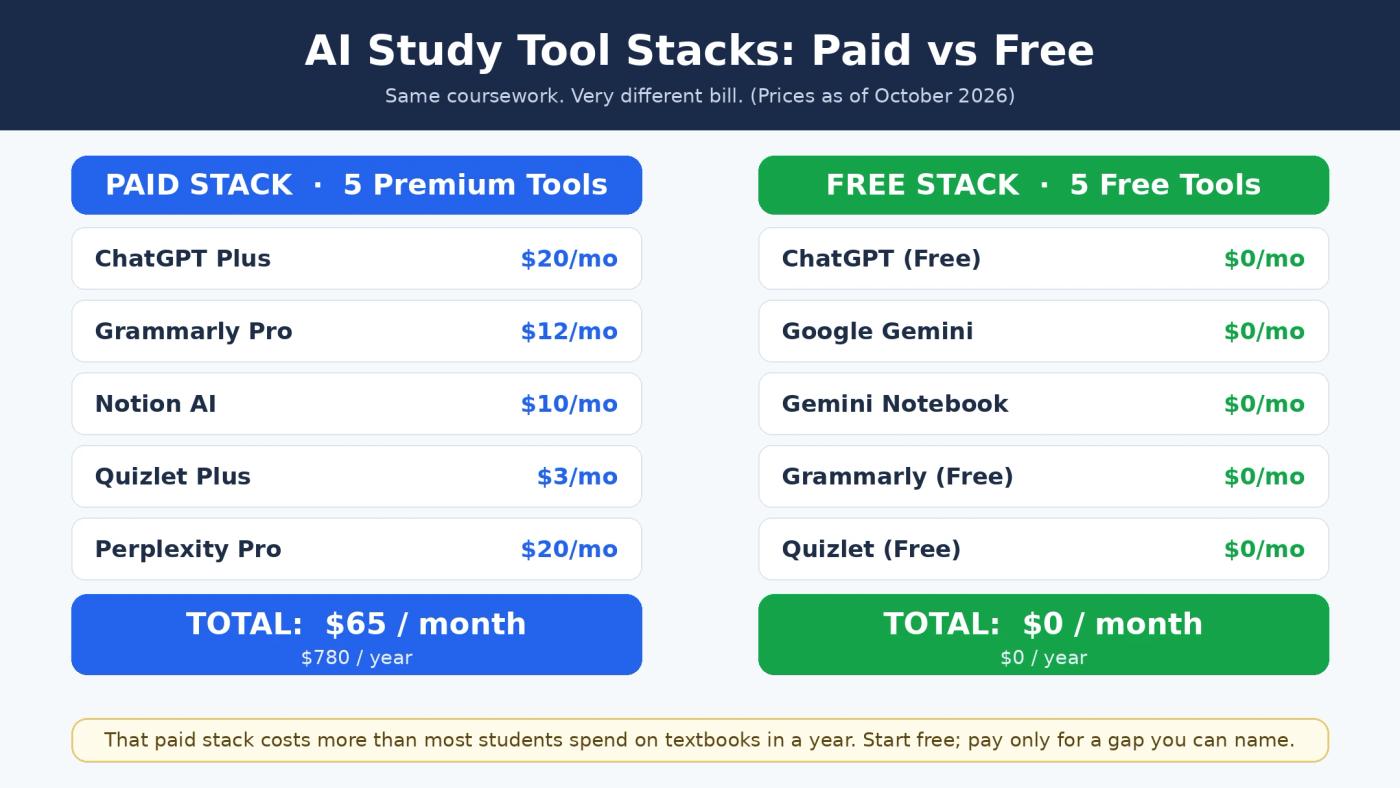
The Subscription Stack Costs More Than Your Textbooks
Most "best AI tools" articles recommend five or six paid subscriptions without ever adding up the total. Here is what that actually looks like on a student budget.
A typical recommended stack: ChatGPT Plus ($20/mo) + Grammarly Pro ($12/mo) + Notion AI ($10/mo) + Quizlet Plus ($3/mo) + Perplexity Pro ($20/mo) = roughly $65/month or $780/year. For comparison, the average U.S. college student spends around $500–$1,000 per year on textbooks and course materials (College Board). That "essential" AI stack quietly rivals your entire textbook budget.
The truth is, a free alternative stack covers the same ground for most students. Gemini (free with a student Google account) handles general research. Gemini Notebook (free) manages source-based study and audio summaries. Claude's free tier covers deep reading and writing feedback. Grammarly's free tier catches core grammar issues. Quizlet's free tier lets you browse and create flashcards.
Before paying for anything, look into student discounts that most lists never mention. Perplexity offers Education Pro at $10/month (half price) for verified students. Google has offered verified U.S. college students a free year of Google AI Pro. Grammarly gives verified students 50% off Pro for the first year. Khanmigo costs just $4/month. Start at $0, then add a paid tool only when you hit a genuine limitation.
AI Hallucinations Have Real Academic Consequences
Every AI tool on this list can generate information that sounds correct but is not. The most dangerous version of this for students is fabricated citations: AI sometimes invents sources that have realistic-sounding titles, authors, and journal names but do not actually exist.
This is not a theoretical risk. Students have faced academic integrity violations after submitting papers with AI-hallucinated references that professors or librarians traced back to nonexistent publications.
📌 Pro Insight: Not all tools carry equal risk here. Perplexity and Gemini Notebook ground their responses in specific sources (Perplexity cites the web; Gemini Notebook only references your uploaded materials). ChatGPT and Gemini generate responses from broad training data, which means citations need independent verification every time. The safest habit: cross-check every AI-suggested citation through your university library database before it goes into your paper.
Smart Workflows — How Students Actually Use AI to Study
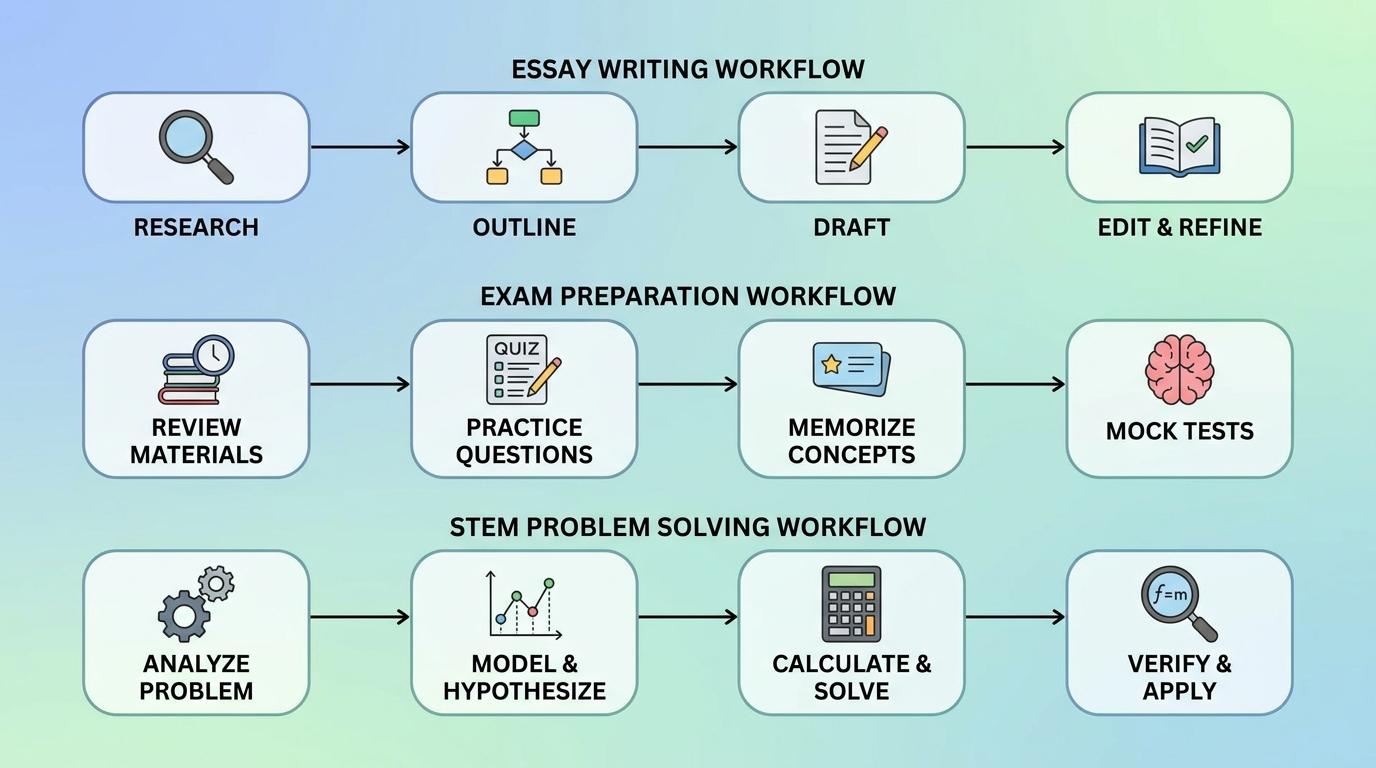
Knowing which tools exist is only half the picture. What separates students who get real value from AI and those who waste time switching between apps is how they chain tools together for specific academic tasks. Here are three workflows built around the tools in this list.
1. Essay Research and Writing. Start with Perplexity to find and cite credible sources on your topic. Move to ChatGPT or Claude to brainstorm arguments, test counterpoints, and draft an outline. Write your draft in Google Docs or Notion, then run the final version through Grammarly to clean up grammar, tone, and clarity. Last step: manually cross-check every citation in your university's library database. No exceptions.
2. Exam Preparation. Record your lectures with Otter.ai, then upload the transcripts to Gemini Notebook to generate audio summaries and study guides grounded in your actual course material. Export key concepts into Quizlet to build flashcard sets for drilling. When you feel ready, switch to Khanmigo or ChatGPT's Study Mode and practice explaining each concept in your own words. If you cannot explain it without help, you have not learned it yet.
3. STEM Problem Solving. Use Gemini or ChatGPT to break down unfamiliar concepts step by step. Verify math solutions and computations with Wolfram Alpha (a dedicated computational engine, not a chatbot). Drill formulas and definitions with Quizlet. For complex proofs or multi-step derivations, work through them with Claude, which handles long reasoning chains well and will push back if your logic has gaps.
⚠️ Common Mistake: Students often try to do everything inside one tool. No single AI covers research, writing, memorization, and computation equally well. A focused two-to-three tool stack matched to the task beats one paid subscription used for everything. For a deeper look at how to build effective AI stacks across different budgets, see this guide to no-code AI productivity tools.
Common Mistakes Students Make With AI Study Tools
FAQ — Best AI Study Tools for Students Questions Answered
What is the best AI for students to use?
It depends on the task. ChatGPT and Gemini work best for general research. Gemini Notebook is strongest for lecture-based study. Perplexity excels at cited research. Grammarly handles writing and grammar. Rather than relying on one paid tool, most students get better results combining two or three free options.
Is ChatGPT free for students?
ChatGPT offers a free tier with access to the GPT-5.6 Luna model, subject to usage limits. OpenAI has also run promotional periods offering free ChatGPT Plus access to verified U.S. college students, most recently four free months claimable by October 31, 2026. Check OpenAI's education page for current availability and eligibility details.
Can teachers detect AI-generated work?
Yes. Tools like Turnitin now include AI detection features that flag AI-written text. However, accuracy varies and false positives do occur. The safest approach is using AI as a study and research aid to support your learning, not as a content generator for direct submission.
Is using AI for studying considered cheating?
Using AI to learn, research, and practice is generally accepted at most institutions. Using AI to generate and submit work as your own typically violates academic integrity policies. Policies differ between schools and even between professors, so always check your institution's specific AI use guidelines.
Is NotebookLM free for students?
Yes. Google renamed NotebookLM to Gemini Notebook in July 2026, and it remains completely free for anyone with a Google account, with up to 100 notebooks and 50 sources each. It analyzes only the sources you upload, which makes it particularly useful for studying specific course materials without the risk of AI-generated hallucinations pulling from unrelated information.
Final Thoughts — Choosing the Right AI Study Tool
The best AI study tool is the one that fits your workflow and budget, not the one with the longest feature list. Start with a free stack: Gemini for research, Gemini Notebook for source-based study, and Grammarly's free tier for writing. Add a paid subscription only when you hit a real limitation that free alternatives cannot solve.
Whatever tools you choose, treat AI as a study partner, not a shortcut. Verify every citation, rewrite every draft in your own voice, and use study modes that push you to think rather than copy. These tools will keep evolving throughout the academic year, so bookmark this guide and revisit it as new updates roll out.
Related Articles


